Our picks in this guide
Compare the models in this guide
See today’s price, delivery options and customer reviews on Amazon.
As an Amazon Associate, I earn from qualifying purchases.In this article 10 sections
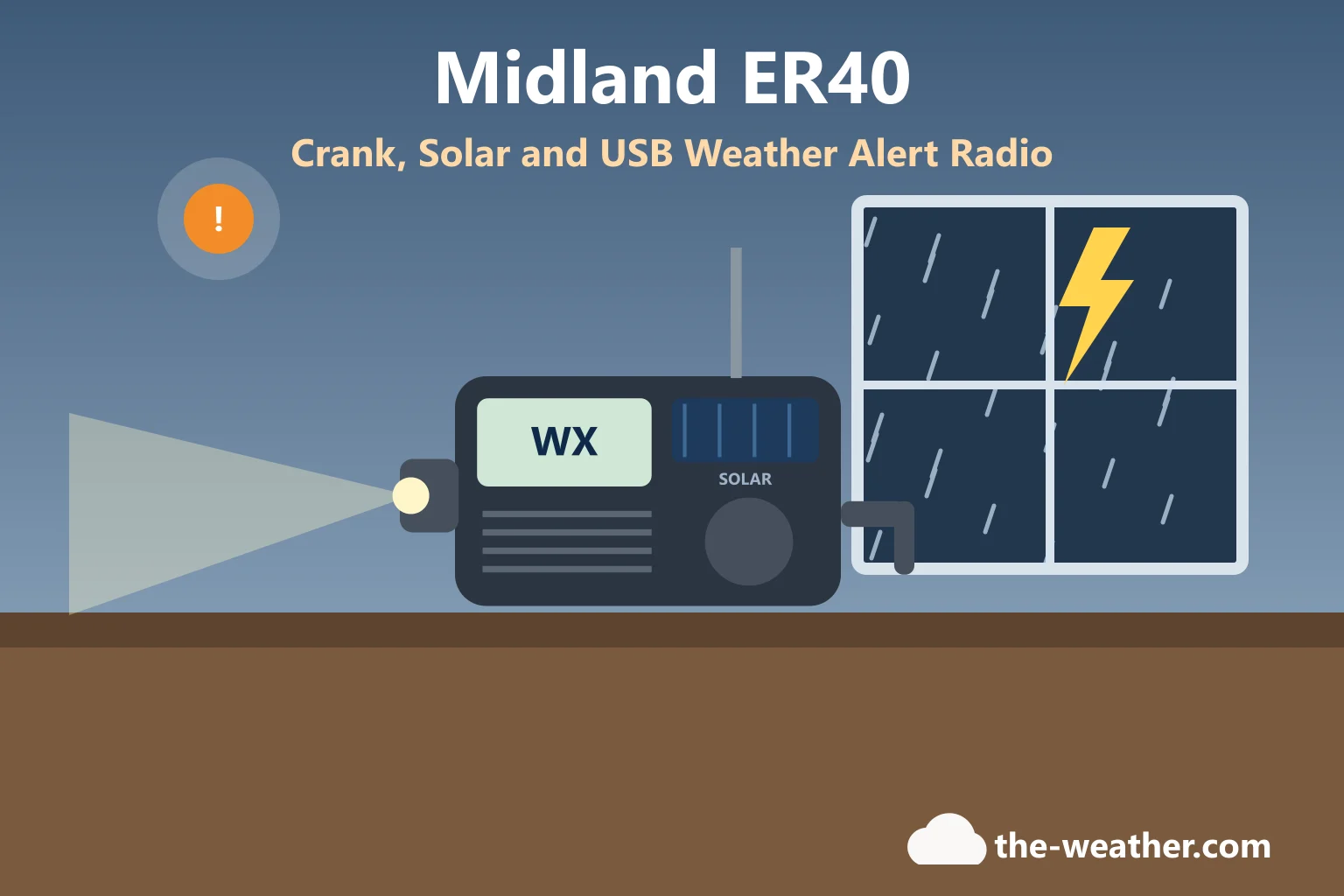
The Midland ER40 is a small emergency radio that does four jobs: it sounds a siren when the National Weather Service sends an alert, it plays AM and FM news, it lights the way and it gives your phone a little charge. It charges by USB, by hand crank or by sunlight. Below is everything Midland's own manual and spec sheet say about it, where it falls short, and how it compares with Midland's bigger ER310.
Short answer: the Midland ER40 is a compact NOAA weather alert radio with AM/FM, a flashlight with SOS strobe, phone charging by USB, and three ways to charge its replaceable 2,600 mAh lithium-ion battery: USB, hand crank and solar panel. According to its manual it can sound an alert even when it is switched off, as long as alerts are on and it is tuned to your local weather station. Its limits: no alerts while it is charging your phone, no AA battery backup, no published run time, and Midland's documents do not mention SAME county filtering (ER40 owner's manual).
Quick verdict
- Good: NOAA alerts with siren and flashing light, also when the radio is off.
- Good: three ways to recharge its one replaceable battery: USB, hand crank and sun.
- Good: small and simple, with a wrist lanyard for a go-bag.
- Watch out: no weather alerts while it charges a phone.
- Watch out: no AA backup and no run time from Midland.
- Watch out: no SAME county filtering in Midland's documents.
Affiliate link: we may earn a commission if you buy through it, at no extra cost to you. We have not tested the ER40 ourselves.
Editorial Research & Review
- Reviewed by
- Lena Thornton, Weather Station Analyst & CWOP Contributor
- Based on
- Midland's ER40 owner's manual, ER40 spec sheet and ER40 product page; Midland's ER310 product page and ER310 spec sheet; and the National Weather Service's NOAA Weather Radio pages. We did not test these radios ourselves. All numbers are Midland's; nothing was measured by us. Where we give our own opinion, we say so.
- Research last verified
- October 20, 2026
Midland ER40 Specs at a Glance
| Feature | What Midland says |
|---|---|
| Radio bands | AM, FM and the weather band (WX) |
| NOAA weather channels | 7 channels, 162.400 to 162.550 MHz |
| Weather alert | Audible siren and flashing flashlight, then the radio switches to the weather station you tuned |
| Alerts when switched off | Yes, if alerts are on and the radio is tuned to a local weather station |
| Alerts while charging a phone | No |
| Battery | 3.7 V, 2,600 mAh lithium-ion, size 18650, replaceable, included (Midland part BATT26L) |
| Other batteries | None: the manual says it does not support alkaline batteries; use only the Midland battery |
| Charging the radio | Micro-USB port, hand crank, solar panel |
| Charging your phone | USB output port (no output current or list of supported phones published) |
| Flashlight | Low, high and an SOS Morse code beacon (no brightness figure published) |
| Display and clock | Backlit LCD (always on, 5-second timer or off), 12 or 24-hour clock |
| Reception | Up to 50 miles from the weather station, depending on location, weather and terrain |
| Other | Telescopic antenna, headphone jack, wrist lanyard, low-battery indicator |
| Run time | Not published by Midland |
| Size | Not published for the radio itself; the gift box is 6.8 x 4.3 x 2.0 inches and weighs 1.0 lb |
| Warranty | One year; accessories, including batteries and charge cables, 90 days; water damage is not covered |
Sources: ER40 owner's manual, ER40 spec sheet, Midland ER40 product page. Checked October 20, 2026.
What is in the box, according to Midland's product page and spec sheet: the radio, the rechargeable 2,600 mAh battery, a wrist lanyard and the owner's manual. Midland's manual mentions a provided USB cable three times and says "Only use the provided Midland USB cable for charging", but neither box list names the cable, so check the box when it arrives. The charging port is micro-USB, not USB-C, which matters if your drawer is full of USB-C cables.
How the ER40 Weather Alert Works
This is the reason to buy a weather radio, so here are the steps from Midland's manual, in order:
- First use: turn the radio over and pull out the yellow battery tab completely.
- Switch on: press and hold the power button for three seconds.
- Pick the weather band: press the power/band button until you reach WX.
- Find your channel: use the tune buttons to select the weather channel for your area, or press and hold to scan to the next active channel. The manual points to weather.gov/nwr/counties to find the channel for your location.
- Turn alerts on: press the weather alert button. The WX icon on the screen flashes when alerts are active.
When an alert comes in, the radio sounds a siren, the flashlight flashes and the radio switches to the weather station you tuned, so you hear what the alert is about. Press any button to stop the alert. To turn alerts off, press the alert button again: the WX icon stops flashing (in weather band) or disappears (in AM/FM).
Two notes from the manual matter more than all the others:
- The ER40 receives alerts when it is powered off, as long as it is tuned to a local weather station and alerts are activated. You can switch alerts on and off while the radio is off, and the screen then still shows the clock, the battery status and the alert icon, so you can see at a glance that it is armed.
- The ER40 does not receive alerts while it is charging another device. If the radio is on when you plug in a phone, it switches itself off and goes into charge mode.
For better reception, Midland says to pull the antenna all the way out and turn it until the sound is clear; indoors, a spot near a window usually helps.
About SAME: SAME is the code that lets some weather radios sound only for your own county. Midland's ER40 manual, spec sheet and product page do not mention SAME. In our reading, that means the ER40 alerts for whatever its weather station broadcasts, which can include nearby counties. If county filtering matters to you, see how SAME codes work on a Midland radio. Midland's ER40 documents also say nothing about the weekly test broadcast or about customizing alerts, so we do not claim either way.
How to Charge the Midland ER40
Everything runs on one battery: a 3.7 V, 2,600 mAh lithium-ion cell (size 18650). You can fill it three ways, according to the manual:
- USB: connect the provided Midland USB cable to a USB power source and to the radio's micro-USB port. The manual says to use only the provided Midland cable.
- Hand crank: turn the crank. Midland says the speed and the length of time you crank decide how much charge goes in. It does not publish how many minutes of radio one minute of cranking gives.
- Solar panel: put the solar panel in direct sunlight.
While it charges, the battery bars on the screen cycle from none to three. The manual also says: use only the Midland lithium-ion battery, the radio does not take alkaline batteries, and setting the backlight to "always on" shortens battery life. Need a spare BATT26L battery? The manual lists Midland Customer Service at (816) 241-8500, Monday to Friday, 8:00 am to 4:30 pm CST.
Charging your phone from it: plug your phone's own USB cable into the port marked USB on the side. Midland says the radio should be fully charged first. Midland does not publish the ER40's USB output or which phones it supports, so in our view treat it as a small top-up for a call or a text, not a full phone charge. And remember the catch from the alert section: no weather alerts while it charges your phone.
Our routine (in our view): charge it by USB before hurricane or storm season and after every use, and treat the crank and the sun as backups for a long outage. A crank radio is a bit like a spare tire: great to have, not how you want to drive every day.
Midland ER40 vs ER310
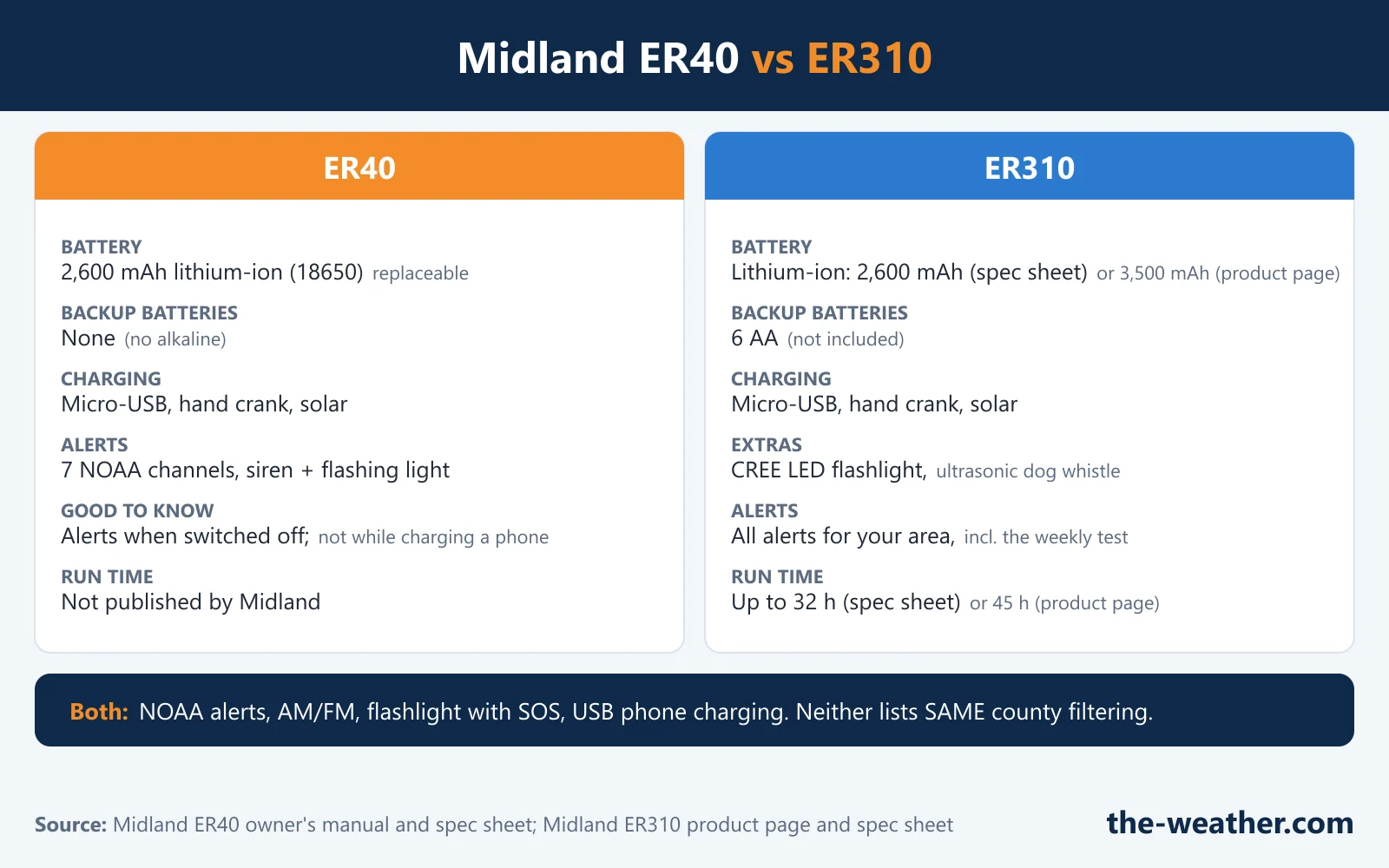
| Midland ER40 | Midland ER310 | |
|---|---|---|
| Battery | 2,600 mAh lithium-ion (18650), replaceable | Lithium-ion: 2,600 mAh on Midland's spec sheet, 3,500 mAh on its current product page |
| Backup batteries | None (no alkaline) | 6 AA batteries (not included) |
| Run time from Midland | Not published | Up to 32 hours (spec sheet) or up to 45 hours (current product page) |
| Charging the radio | Micro-USB, hand crank, solar | Micro-USB, hand crank, solar |
| Flashlight | Low, high, SOS Morse code | CREE LED (spec sheet); the product page lists 1,400 lux; low, high, SOS Morse code |
| Extras | Wrist lanyard, headphone jack | Ultrasonic dog whistle for search and rescue dogs |
| Phone charging | USB out; no alerts while charging; Midland does not say which phones it supports | USB out; Midland's FAQ says newer iPhones (X and later) and Android phones can draw too much power for it |
| Weather alerts | 7 NOAA channels, siren and flashing light; alerts while switched off; the weekly test is not mentioned | NOAA alerts; Midland says it receives all area alerts, including the weekly test |
| SAME county filtering | Not mentioned | Not mentioned; Midland says alerts cannot be customized |
| Size | Gift box 6.8 x 4.3 x 2.0 in (radio size not published) | Radio 8.0 x 3.4 x 2.4 in on the product page (the older spec sheet lists 9.61 x 6.85 x 2.95 in and 1.46 lb) |
| On Amazon | See the ER40 | See the ER310 |
Sources: ER40 owner's manual and spec sheet; Midland ER310 product page (including its FAQ) and ER310 spec sheet. Midland's two ER310 documents give different battery and size figures; check the listing you buy from. Checked October 20, 2026.
Which one, in our view? The ER40 is the simpler radio, and Midland calls it a "compact design" (its radio size is not published). The ER310 is the one for long outages: it can run on 6 AA batteries from any store when the lithium battery and the sun both let you down, and Midland publishes a run time for it. If you already own an ER310, the ER40 makes sense as a second radio for the car or a go-bag, not as an upgrade. More on that model in our Midland ER310 review, and Midland's ER210 is compared in ER310 vs ER210. Prefer a crank radio from another brand? See our Eton Quest review and ER310 vs Eton FRX3.
What the ER40 Does Not Do
- No alerts while charging a phone. This is the one to remember on a stormy night.
- No SAME county filtering in Midland's documents.
- No AA or alkaline backup. If the lithium battery is empty, you crank or wait for the sun.
- No published run time, and no crank-to-minutes figure.
- Micro-USB, not USB-C, for charging the radio.
- No water resistance rating. Midland lists none, and its warranty excludes water damage, so keep it dry.
- Reception is limited: up to 50 miles from the weather station, according to Midland, depending on location, weather and terrain. The National Weather Service gives about 40 miles on level terrain as typical (NWS).
What Midland does not tell you about the ER40: the radio's own size and weight, the battery run time, how long the battery lasts on standby with alerts on, how many minutes of radio a minute of cranking gives, the flashlight brightness, the USB output for phones and where the radio is made. If you see these numbers elsewhere, they did not come from Midland's ER40 documents.
Should You Buy the Midland ER40?
A good fit: a go-bag, a car, a camper or a kitchen drawer for hurricane season, when you want weather alerts, AM/FM news and a light that do not depend on the power grid or a cell signal. Ready.gov's hurricane advice: "Be sure to have several ways to receive alerts" (Ready.gov). A weather radio is one of them.
Skip it if: you want a bedside alarm that sounds only for your county (look at a SAME desktop radio such as the one in our Midland WR400 review), or you want a radio that runs for days on store-bought batteries (look at the ER310 above).
In our view, the ER40 is an honest little radio for its job. Just set it up before the storm, not during it: finding your weather channel with a flashlight in your teeth is nobody's idea of fun.
Ready for the next power outage?
See the Midland ER40 crank and solar weather radioon Amazon · opens in a new tabAffiliate link: we may earn a commission if you buy through it, at no extra cost to you. More options: weather radios for hurricane season · emergency weather radios · NOAA weather alert radios
Where a Radio Fits in Your Hurricane Plan
A radio is one piece of the plan, not the plan. Know what the alerts mean (hurricane watch vs warning), know your evacuation zone before a storm comes, understand storm surge, and know where to follow a storm officially. And always follow your local officials.
Midland ER40 FAQ
How do you charge the Midland ER40?
Three ways, according to Midland's manual: a USB power source into the micro-USB port, the hand crank, or the solar panel in direct sunlight. The battery bars cycle while it charges. Before the first use, pull out the yellow battery tab.
Does the Midland ER40 alert you when it is turned off?
Yes. The manual says it receives weather alerts when it is powered off, as long as it is tuned to a local weather station and alerts are activated. It does not receive alerts while it is charging another device.
Does the Midland ER40 have SAME?
Midland's ER40 manual, spec sheet and product page do not mention SAME county filtering. For alerts limited to your county, a SAME desktop weather radio is the usual choice.
What battery does the Midland ER40 use?
A replaceable 3.7 V, 2,600 mAh lithium-ion battery, size 18650, included with the radio. Midland's part number is BATT26L. The manual says not to use alkaline batteries and to use only the Midland battery.
What is the difference between the Midland ER40 and ER310?
According to Midland, the ER310 adds a 6 AA battery backup, a CREE LED flashlight, an ultrasonic dog whistle and a published run time. The ER40 is the simpler radio with one lithium battery and no published run time. Both charge by micro-USB, crank and sun, and neither lists SAME.
Does the Midland ER40 need batteries?
Yes, one: the included 2,600 mAh lithium-ion battery (18650). The hand crank, the solar panel and USB all recharge that battery. It does not take AA or other alkaline batteries, and Midland does not publish a run time.
Are Midland radios good?
We cannot judge a whole brand without testing. For the ER40, in our view, Midland documents the important things well: the manual spells out how alerts work, including the catch while charging a phone. Midland Radio Corporation is based in Kansas City, Missouri, and gives a one-year warranty on the ER40. Its documents do not say where the radio is made.
Is the Midland ER40 waterproof?
Midland does not list a water resistance rating for the ER40, and its warranty does not cover water damage. Keep it in a dry bag or box in a go-kit.
Update Log
- October 20, 2026: First version. ER40 details from Midland's owner's manual, spec sheet and product page; ER310 comparison from Midland's ER310 product page and spec sheet.
Sources
- Midland ER40 owner's manual (alerts, channels, charging, battery, menu, reception, warranty)
- Midland ER40 spec sheet (features, battery part number, box contents, box size)
- Midland ER40 product page
- Midland ER310 product page and FAQ
- Midland ER310 spec sheet
- National Weather Service: NOAA Weather Radio coverage by county
- Ready.gov: Hurricanes
More radios: Midland ER310 · ER310 vs ER210 · Midland WR400 · Eton Quest · Weather radio for power outages
Ready to decide?
Find your pick on Amazon
Prices and stock change daily. Check the current price, delivery options and what owners say in their reviews.
Our top picksCompare our picks on AmazonToday's price, delivery & owner reviews on Amazon
Check on Amazon →