As an Amazon Associate, I earn from qualifying purchases.
In this article 15 sections
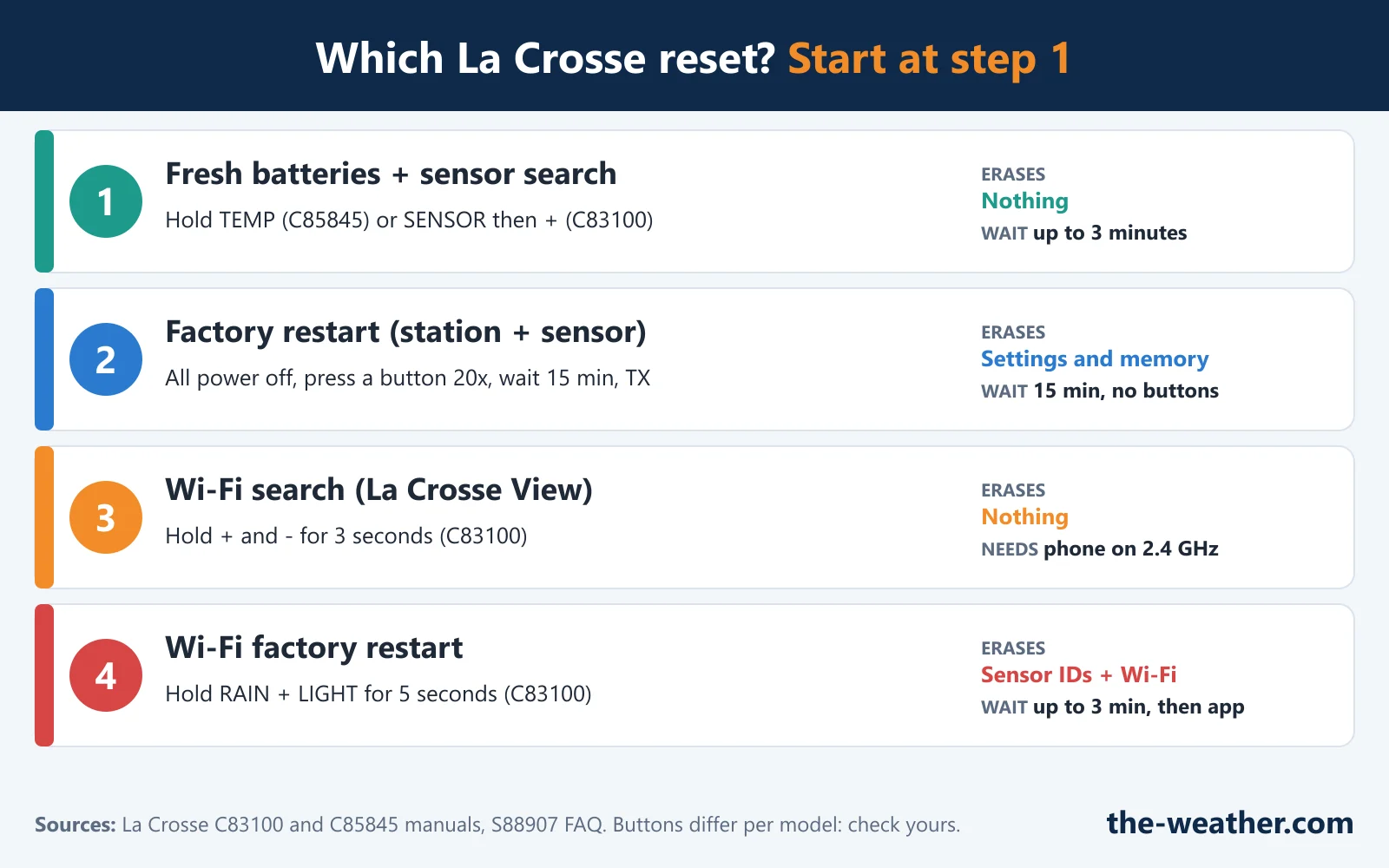
- Which La Crosse Reset Do You Need?
- Before You Reset: Three Quick Checks
- Reset 1: Sensor Search (Quick Connect)
- Reset 2: Factory Restart (Station and Sensor)
- Basic Restart for Simple Stations (No Wind or Rain)
- Reset 3: Wi-Fi Stations (La Crosse View)
- Clear One Record (Rain, Wind, HI/LO)
- Time Wrong? The Atomic Time Signal
- Dim, Blank or Garbled Display
- After the Reset: How Long to Wait
- Still Not Working After a Reset?
- Your Model Is Not on This Page?
- La Crosse Reset FAQ
- Update Log
- Sources
Dashes where the outdoor temperature should be. A station that lost its Wi-Fi after you changed routers. A rain total that still counts last spring. Each of these has a reset, but La Crosse uses several kinds, and the wrong one can wipe more than you wanted. Here is which reset fits your problem, with the steps taken from La Crosse's own manuals and support pages.
Short answer: start small. If the outdoor reading shows dashes, first put fresh batteries in the sensor and run a sensor search (on the C85845: hold TEMP for 3 seconds and wait up to 3 minutes). If that fails, do a factory restart. On many La Crosse stations that means removing all power, pressing a station button at least 20 times and waiting 15 minutes before you power up again. Some newer stations reset with two buttons instead, such as ALERTS and LIGHT on the S77925 or RAIN and LIGHT on the Wi-Fi C83100. The buttons differ per model, so find yours below.
Editorial Research
- Written by
- Lena Thornton, Weather Station Analyst & CWOP Contributor
- Based on
- La Crosse Technology's instruction manuals for the C83100 (Wi-Fi station), the S77925 and the C85845 (set-up guide for all versions and the V3 manual), the S88907 FAQ, and La Crosse's support pages on the basic restart, La Crosse View troubleshooting and View sensor help. We did not try these resets on our own station.
- Research last verified
- October 21, 2026
Which La Crosse Reset Do You Need?
Pick the row that matches what you see. The resets go from small (nothing is erased) to big (everything is erased), so try them in this order.
| What you see | Try this | What it erases |
|---|---|---|
| Dashes (- -) for the outdoor reading, station was working before | Fresh batteries, then a sensor search | Nothing |
| Sensor search did not help, or a new sensor will not pair | Factory restart (simple stations: basic restart) | Settings and memory: check the time and settings afterwards |
| "LOST WIFI" or a new router or Wi-Fi password (La Crosse View stations) | Wi-Fi search, then a factory restart | The search: nothing. The restart: sensor IDs and Wi-Fi settings |
| An old rain total, wind record or HI/LO reading you want gone | Clear one record | Only that one reading |
| Time is off, or it is off by whole hours | Time signal search and the Settings Menu | Nothing |
| Dim, blank or garbled display, or HH.H / LL.L indoors | Power reset of the display | Settings and memory |
Sources: La Crosse manuals and support pages listed at the bottom. Each step below names the model it comes from.
What La Crosse does not make obvious: there is no pinhole "reset" button on the stations in the manuals we checked. The reset is done with the normal buttons, and the same buttons do different things on different models. On the S88907, holding + and - starts a time signal search; on the C83100, holding + and - for 3 seconds starts a Wi-Fi search. "Factory reset" means pulling the power and pressing a button 20 times on one model, holding ALERTS and LIGHT on the S77925, and holding RAIN and LIGHT on the C83100. That is why every step on this page names its model. The TX button on the outdoor sensor sends a signal; it is not a reset.
Before You Reset: Three Quick Checks
The S88907 FAQ explains that dashes mean the connection between the station and the outdoor sensor is lost, and puts it plainly: "Many problems are resolved with fresh batteries." A reset with tired batteries just fails again, so check these first:
- Batteries. Use fresh, name-brand alkaline batteries in the outdoor sensor, with an expiration date at least 6 to 7 years ahead (the S88907 FAQ says six, La Crosse's basic restart page says seven). The basic restart page says to avoid "super", "ultra", "max", "heavy duty" and rechargeable batteries. The S88907 FAQ adds that lithium is an option below -20°F.
- Distance and obstacles. The S88907 FAQ gives a handy rule: cut the open-air range in half for every wall, window, tree or bush in the signal path. Metal fences, stucco (it has a metal mesh inside) and moisture all weaken the signal. The same FAQ suggests turning the station 90 degrees toward the sensor, so more of its antenna faces the signal.
- Electronics and channels. Keep the station at least 6 feet from routers, cordless phones, TVs, microwaves and baby monitors (S88907 FAQ). Using extra temperature sensors? The S77925 manual says to give each one a different channel (1, 2, 3) before you put the batteries in.
Lost signal only now and then? The S88907 FAQ says that can be normal in some places, and to give it 2 to 4 hours to reconnect by itself before you start resetting.
Reset 1: Sensor Search (Quick Connect)
This is the gentlest fix. The station listens for the outdoor sensor again, and nothing is erased. The S88907 FAQ calls it a quick connect for a station and sensor "that have been working but lost connection due to interference or low batteries". The button depends on your model:
| Station | How to start the search | Wait |
|---|---|---|
| C85845 color station (all versions) | Hold TEMP (the V3 manual says 3 seconds). The reception icon starts to move. | Up to 3 minutes |
| S77925 color station | Hold EXTRA to search for all sensors. | Not stated in the manual |
| S88907 | Bring both units inside, 5 to 10 feet apart. Hold HEAT/DEW for 5 seconds, then press TX in the sensor's battery compartment. | 2 minutes |
| C83100 Wi-Fi station | Press SENSOR until the sensor type shows, then hold +. The reception indicator flashes. | Up to 3 minutes |
Sources: C85845 set-up guide and V3 manual, S77925 manual (Button Functions), S88907 FAQ (Quick Connect), C83100 manual (Sensor ID and Search).
The C85845 V3 manual adds a useful tip: if the search fails while the sensor is mounted outside, bring it within 10 feet of the station and search again. If it works up close but not outside, the problem is distance or obstacles, not the station.
Reset 2: Factory Restart (Station and Sensor)
This is the big reset. La Crosse says it returns the station and sensor to an "out-of-the-box" default state and "often resolves an issue" (S88907 FAQ). How you do it depends on the model:
| Station | Factory reset |
|---|---|
| C85845 (V3 manual) and S88907 | The power-off method: the 10 steps below |
| S77925 | Hold ALERTS and LIGHT together |
| C83100 Wi-Fi station | Hold RAIN and LIGHT together for 5 seconds (see Wi-Fi stations) |
Sources: C85845 V3 manual, S88907 FAQ, S77925 manual (Button Functions), C83100 manual (Factory Restart Station).
The power-off method, as written in both the S88907 FAQ and the C85845 V3 manual:
- Remove all power from the outdoor sensor and the station: batteries and the AC adapter.
- Press one of the buttons on the station at least 20 times to clear all memory.
- Check that the station screen is blank. (A few lines printed on the screen may still show; that is normal.)
- Leave both units without power for 15 minutes. La Crosse marks this step "very important".
- Plug the AC adapter into the wall, then into the station.
- Put fresh batteries in the outdoor sensor.
- Press the TX button on the sensor to send a signal.
- Keep the sensor 5 to 10 feet from the station.
- When the outdoor temperature appears, let both sit together for 15 minutes to build a strong connection.
- Do not press any buttons for those 15 minutes.
Sources: S88907 FAQ (Weather Station Factory Restart) and C85845 V3 instruction manual (Factory Restart). Afterwards, check the time and date in the Settings Menu.
The step that matters most is the 15-minute wait: La Crosse calls it "very important". Pulling the batteries for ten seconds is not the same reset. Make a cup of coffee, and leave the buttons alone.
- Sensor without a TX button? Just put the batteries in. The C83100 manual only says to press TX "if the sensor has a TX button".
- Which C85845 steps? La Crosse's set-up guide for all C85845 versions gives a shorter version (power off, 20 presses, a few moments, new sensor batteries, power up). If that does not help, use the full 10 steps above from the V3 manual.
- Which goes in first? The factory restart above plugs in the station first and then the sensor; the basic restart starts with the sensor. Follow the order given for your type of station.
- Mounted sensor? Only move it back outside after the reading is steady. The S88907 FAQ suggests leaving the sensor in its spot for about an hour before you screw it in for good.
Sensor still silent after a factory restart?
La Crosse TX141TH-Bv3 outdoor sensoron Amazon · opens in a new tabThis is the outdoor sensor listed in the manuals of the S77925 and the C85845 V3. Other stations use other sensor models: check your manual's sensor list first, since La Crosse warns to order "the correct model and frequency".
Basic Restart for Simple Stations (No Wind or Rain)
For clocks and stations that only show temperature and humidity, La Crosse has a separate basic restart page. It is close to the factory restart, with slightly different times. If your own manual has its own restart steps, use those first.
- Bring the display and the sensor indoors, 3 to 5 feet apart, with nothing between them.
- Remove all power from both units.
- Press one button on the display at least 20 times and check that the display is blank.
- Leave everything without batteries for 10 minutes.
- Put new alkaline batteries in the sensor first.
- Then put batteries in the display, without pressing any buttons.
- Wait at least 15 minutes without pressing buttons. When the outdoor temperature shows, the sensor can go back outside.
Source: La Crosse Technology, Basic Restart / Missing Outdoor Temperature.
Reset 3: Wi-Fi Stations (La Crosse View)
Stations that connect to the La Crosse View app have extra reset options. The steps below are from the C83100 manual.
| Problem | What to do (C83100) | What it erases |
|---|---|---|
| Station shows LOST WIFI | Check that the power cord is plugged in (Wi-Fi needs it). Put your phone on the same 2.4 GHz network you want the station on. Then hold + and - together for 3 seconds to search for Wi-Fi. | Nothing |
| Station shows CHECK APP | Wi-Fi works, the app link does not. Open the La Crosse View app, check its notifications and look for an update. | Nothing |
| Station shows NO WEATHER SERVICE | Nothing to reset: Wi-Fi and the app are fine, the weather server is not answering. The manual says to be patient. | Nothing |
| New router, new password, or sensors that will not reconnect | Factory restart: hold RAIN and LIGHT together for 5 seconds. Allow up to 3 minutes for the sensors, then choose CONNECT WIFI in the app menu and enter your Wi-Fi password. | All sensor IDs and Wi-Fi settings |
Source: C83100 instruction manual (Status Messages, Button Functions, Factory Restart Station). Press SET once to see the station's current status message.
Another La Crosse View display, not the C83100? Use the factory restart in your own manual first (La Crosse puts it on the product page's Support tab). La Crosse's general View sensor help page, written for View displays and their add-on sensors, gives this sequence when sensors show dashes or stay at zero:
- Bring the sensors inside next to the display and take out their batteries.
- Factory restart the display by "pressing and holding the two outermost buttons until everything resets". La Crosse warns this "will clear any preset settings, internet connections, and historical data", so write down your rain totals first.
- Unplug the display and remove any AA or AAA batteries from it. Press any button at least 25 times. (Coin-cell backup batteries can stay in.)
- Put new name-brand alkaline batteries in the sensors that did not connect.
- Plug the display back in. The sensor readings should appear shortly.
- Only when the sensors are updating, reconnect Wi-Fi: phone on a 2.4 GHz network, then Connect WiFi in the La Crosse View app menu.
Source: La Crosse Technology, View Sensor Help. To check the sensors afterwards, La Crosse suggests spinning the wind cups for 30 seconds and tipping the rain cups at least 10 times. Its Wi-Fi troubleshooting page adds: "If you changed your Wi-Fi network you may need to complete a factory restart to reset the Wi-Fi settings."
La Crosse also notes that the station itself cannot use the 5 GHz bands of a dual-band router, so your phone must be on 2.4 GHz during setup. Many routers broadcast both under one name; our 328-69357 Wi-Fi guide explains what to do then.
Clear One Record (Rain, Wind, HI/LO)
Want to reset only the rain total, not the whole station? Many La Crosse stations can clear their history without a full reset.
| Station | How to clear | Good to know |
|---|---|---|
| C83100 Wi-Fi station | Press RAIN, TEMP or WIND until the reading you want shows, then hold - for 5 seconds. | Rain goes back to zero; temperature, humidity and wind go back to the current values. One reading at a time. |
| S77925 | Press HISTORY to view the records, then hold - to reset them. | Rain only shows if you added an optional extra rain sensor. |
| S88907 | Hold ▲ 5 seconds (MAX) or ▼ 5 seconds (MIN). | No rain or wind sensor. MIN/MAX also reset by themselves at midnight. |
| C85845 color station | Nothing to press | HI/LO records reset automatically at midnight. No rain or wind sensor. |
Sources: C83100 manual (Rainfall, Wind and Temperature History), S77925 manual (Button Functions, Extra Sensors), S88907 FAQ (MIN/MAX), C85845 manuals (Records). On the C83100, the rain NOW reading also goes back to zero by itself after 30 minutes without rain, and the 1 hour, 24 hour and 7 day totals count down to zero when it stays dry.
Time Wrong? The Atomic Time Signal
Many La Crosse stations set their clock from WWVB, a radio time signal. A wrong time is usually a reception or settings issue, not something a full reset fixes.
| Station | Search for the time signal | Open the Settings Menu |
|---|---|---|
| C85845 | Searches by itself at 7:00 to 11:00 UTC. Press SET to search right away. | Hold SET (the V3 manual says five seconds) |
| S77925 | Searches by itself at 7:00 to 11:00 UTC. Press SET to start or stop a search. | Hold SET |
| S88907 | Hold + and - together to search at night. Allow up to 5 nights. | Hold TIME SET for five seconds |
| C83100 | Gets its time from the internet once connected to La Crosse View | Hold SET for 3 seconds |
Sources: C85845 set-up guide and V3 manual, S77925 manual, S88907 FAQ, C83100 manual. In the Settings Menu, use + and - to change a value and SET to move on.
- Off by whole hours? Check the time zone and the DST setting in the Settings Menu. The signal sets the clock to the zone you selected (Eastern is the default, according to the C85845 V3 manual). The S77925 has a DST option called AUTOMATIC that switches by itself.
- No signal? The S88907 FAQ advises turning the station so its front or back faces Colorado, and checking the batteries.
Dim, Blank or Garbled Display
A display problem is usually a power problem, according to the S88907 FAQ. Its fix for a dim, blank or garbled display, missing segments, or HH.H / LL.L / dashes for the indoor reading:
- Remove the batteries from the station (and unplug it).
- Press any button 20 times.
- Leave the station without power for 1 to 2 hours.
- Put in fresh alkaline batteries, the right way around.
Brand new station with odd numbers on the screen? Look for a thin plastic scratch guard with printed numbers for store displays. The FAQ says the real numbers show behind it and look distorted. Peel it off.
If the indoor reading still shows dashes, HH.H or LL.L after this, the S88907 FAQ says the station may need to be replaced.
After the Reset: How Long to Wait
A reset is not finished when the screen lights up. These are the waiting times from the manuals, so you know when to worry and when to put the kettle on:
| What | How long | Model and source |
|---|---|---|
| Sensor search | Up to 3 minutes | C85845, C83100 |
| Strong link after a factory restart (no buttons) | 15 minutes | S88907, C85845 V3 |
| Sensors found again after the Wi-Fi factory restart | Up to 3 minutes | C83100 |
| Sensor notifications in the La Crosse View app | Within 15 minutes after the station connects | C83100 |
| Atomic time signal | Up to 5 nights | S88907 |
| Pressure reading settles | Up to 3 days (C83100), up to 10 days (S77925) | C83100, S77925 |
| Forecast icons become reliable | 7 to 10 days (C85845), 3 to 4 weeks (S88907) | The station learns the local pressure again |
So a forecast icon that looks silly the day after a reset is not a sign the reset failed. The station is still learning your local air pressure.
Still Not Working After a Reset?
La Crosse's S88907 FAQ has a few simple tests that tell you whether the sensor, the station or the spot is the problem:
- Freezer test: put the outdoor sensor in the freezer for an hour and watch the station. If the temperature drops, the station is reading your sensor (and not a neighbor's).
- Side-by-side test: place the sensor next to the station for 2 hours. Indoor and outdoor readings should be within 4 degrees of each other.
- Indoor distance test: after a restart, move the sensor to another room with one wall between them. If the reading holds for an hour indoors but not outside, look for a better outdoor spot.
- Sensor fell in water or snow? The FAQ says La Crosse sensors are water resistant, not waterproof. A sensor that fell into a puddle will likely need replacing.
Problems with a specific model? Our model guides go deeper: S77925 not connecting, C85845 outdoor sensor not connecting and 328-69357 not connecting to Wi-Fi. Display trouble in general: fix La Crosse display issues.
Your Model Is Not on This Page?
La Crosse makes many stations, and the buttons change between models and even between versions (the C85845, for example, came in several versions). La Crosse's advice: use the search icon at the top of lacrossetechnology.com and enter your model number. Each product page has the manual, quick start guide and FAQ under its Support tab, including the factory restart steps. The model number is on the cover of your manual.
No manual at hand? The basic restart is La Crosse's general fix for a missing outdoor temperature on simple stations.
Need a new outdoor sensor?
See the La Crosse TX141TH-Bv3 sensoron Amazon · opens in a new tabThe S77925 and the C85845 V3 list this sensor in their manuals. Other stations use other sensor models: check the sensor list in your manual first.
La Crosse Reset FAQ
How do I reset my La Crosse weather station?
Start with fresh sensor batteries and a sensor search (TEMP on the C85845, EXTRA on the S77925). If that fails, do a factory restart: on the C85845 and S88907, remove all power, press a station button at least 20 times, wait 15 minutes, plug the station in, put fresh batteries in the sensor, press TX and leave the buttons alone for 15 minutes. The S77925 resets by holding ALERTS and LIGHT, the C83100 by holding RAIN and LIGHT for 5 seconds.
Where is the reset button on a La Crosse weather station?
The stations in the La Crosse manuals we checked have no separate reset button. The reset is done with the normal buttons, for example pressing a button 20 times without power, holding ALERTS and LIGHT on the S77925, or holding RAIN and LIGHT on the C83100. The TX button on the sensor sends a signal; it is not a reset.
Why does my La Crosse station show dashes for the outdoor temperature?
The S88907 FAQ says dashes mean the connection between the station and the outdoor sensor is lost. Fresh batteries often fix it. Then try a sensor search, turn the station 90 degrees toward the sensor, and do a factory restart if needed.
How do I reset the rain total on a La Crosse weather station?
On the C83100, press RAIN until the reading you want to clear shows, then hold the minus button for 5 seconds. On the S77925 (with an optional rain sensor), press HISTORY and hold the minus button to reset the history records. Other models use different buttons, so check your manual. A factory restart also clears the history, together with everything else.
How do I reconnect a La Crosse station to new Wi-Fi?
Make sure the station is plugged in and your phone is on the 2.4 GHz network. On the C83100, hold + and - for 3 seconds to search for Wi-Fi. After a new router or password, a factory restart may be needed (RAIN and LIGHT for 5 seconds on the C83100); then choose CONNECT WIFI in the La Crosse View app.
Does a factory restart erase my settings?
Yes. La Crosse says it returns the station to an out-of-the-box state. On the C83100 it also removes the sensor IDs and Wi-Fi settings, and La Crosse's View help says the display restart clears historical data. Write down anything you want to keep first.
How long does a La Crosse station take to find the sensor after a reset?
A sensor search takes up to 3 minutes on the C85845 and C83100. After a factory restart, La Crosse says to let the station and sensor sit together for 15 minutes without pressing buttons.
How do I fix the time on my La Crosse weather station?
On the C85845 and S77925, press SET to search for the atomic time signal, or hold SET to open the Settings Menu and check the time zone and DST. On the S88907, hold + and - for a night-time signal search (allow up to 5 nights) and face the station toward Colorado.
Update Log
- October 21, 2026: Page published. Steps checked against the La Crosse manuals for the C83100, S77925 and C85845 (V3 and all-versions set-up guide), the S88907 FAQ and La Crosse's support pages on the basic restart, La Crosse View troubleshooting and View sensor help.
Sources
- La Crosse Technology: C83100 Wi-Fi Professional Weather Station, instruction manual (PDF)
- La Crosse Technology: S77925 Wireless Weather Station, manual (PDF)
- La Crosse Technology: C85845 (all versions) set-up guide (PDF)
- La Crosse Technology: C85845V3 instruction manual (PDF)
- La Crosse Technology: S88907 FAQs (PDF)
- La Crosse Technology: Basic Restart / Missing Outdoor Temperature
- La Crosse Technology: View Sensor Help
- La Crosse Technology: La Crosse View Troubleshooting
- La Crosse Technology: Where do I find a manual for my station?
See also: La Crosse Technology overview · Weather station troubleshooting · AcuRite reset guide · Ambient Weather reset guide