
As an Amazon Associate, I earn from qualifying purchases.
In this article 11 sections
The Tempest is one unit: wind, rain, temperature, humidity, pressure, light and lightning all in one white cylinder. That makes the installation quick. It also means one spot has to work for all of those sensors at once, and that is where a few minutes of thinking pay off for years.
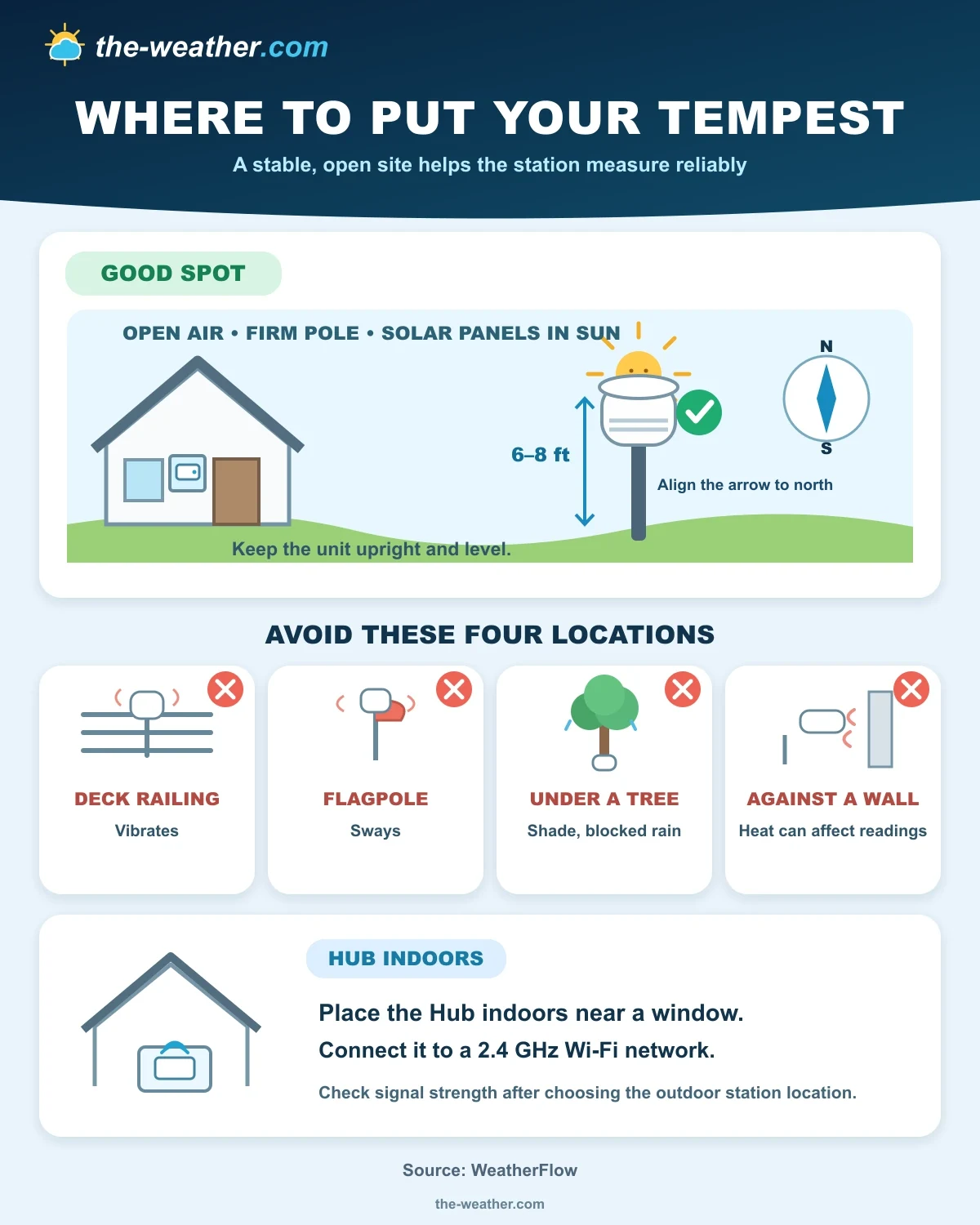
Short answer: pair the Tempest with the app before you mount it. Then pick a spot with as much sun, wind and rain exposure as possible, away from walls, roofs and the ground, on a mount that does not shake. WeatherFlow's mounting tips recommend about 6 to 8 ft (1.5 to 2.5 m) above the ground, clear of trees and buildings. Line it up with north, keep the hub indoors within good Wi-Fi range, and avoid deck railings and flagpoles. Sources: Tempest FAQ and Tempest mounting tips.
Editorial Research
- Written by
- Lena Thornton, Weather Station Analyst & CWOP Contributor
- Based on
- WeatherFlow's Tempest FAQ, its mounting tips (June 2024), its help articles on siting and the bird deterrent, and the Tempest '26 announcement. We did not install a Tempest ourselves for this page.
- Research last verified
- November 25, 2026
Before You Mount: Pair It on the Kitchen Table
WeatherFlow's help pages advise setting up the station in the Tempest app before the Tempest goes outside. That is good advice: if something does not connect, you want to find out at the kitchen table, not on a ladder. The hub can only be set up through the iOS or Android app.
What comes in the box for mounting, according to the FAQ: a flat base with a standard 1/4"-20 thread and a keyhole slot, and a pole mount for poles of 1.25" to 1.315" outside diameter. For reference, 1.315" is the outside diameter of standard 1-inch steel pipe. A pole is not on that list, so plan for one, or use a fence post or wall with the flat base.
Choose the Spot: Sun, Wind and Rain
WeatherFlow's rule of thumb: "Choose a location that allows as much exposure to the wind, rain and sun as possible." Here is why each of those matters for a Tempest:
The mounting tips add one more: avoid "low-lying areas prone to cold air pooling or areas affected by heat islands". So not in the dip at the bottom of the garden, and not above the driveway that bakes all afternoon.
Lightning detection has its own wish: the FAQ advises placing the Tempest away from electrical disturbances, because nearby electrical noise can cause false lightning alerts. Keep a little distance from air conditioners, pool pumps and power lines.
How High Should a Tempest Be?
WeatherFlow's mounting tips say: "The recommended installation is 6 to 8 feet (1.5-2.5 m) above the ground." That height is a good compromise for an all-in-one unit: high enough to clear fences and catch the wind, low enough for a fair temperature reading and easy cleaning.
WeatherFlow's siting help also mentions mounting above a roof line or on a tall structure where obstacles block the wind. That is a trade-off, not a contradiction: higher usually means better wind data, while a spot close to a roof can warm the temperature reading and is harder to reach. If wind is what you care about most, go higher and clear of the roof. If you want balanced readings and easy access, 6 to 8 ft in an open spot is the sweet spot.
For wind, the National Weather Service recommends about 33 ft (10 m), as AcuRite's Iris manual also points out. So do not expect your backyard wind to match the airport. That is not a fault, just a different height. Installing a home weather station explains this for all station types.
Pick a Mount That Does Not Wobble
This matters more on a Tempest than on most stations, because the rain sensor works by feeling vibrations. A mount that shakes can produce rain that never fell. WeatherFlow says the station "should not shake, sway or vibrate in strong winds", and its mounting tips name two places to avoid:
- Deck railings: "prone to vibrations". Footsteps, kids and dogs count too.
- Flagpoles: also "prone to vibrations", and they sway in every breeze.
Good options from the FAQ: on top of a fence, wall, post, pergola or roof using the flat base, or on a sturdy pole using the pole mount. A short, stiff pole beats a tall, thin one. If you are unsure, give the pole a push: if it keeps swinging, the Tempest will feel it too.
Birds: a Tempest on a pole is a lovely perch. If birds keep landing on it and causing false rain or a mess, WeatherFlow sells an optional bird deterrent that fits on top. Its help article says most owners will not need it. More on false rain in Tempest rain accuracy.
Line It Up With North
The Tempest works out wind direction from how it is mounted. WeatherFlow's FAQ says: "Wind direction is determined by physically aligning the sensor device to true north." Its siting help adds that you only need a north (or south) reference point, and the alignment does not have to be perfect. A phone compass is fine. Just remember that a compass shows magnetic north, which can differ a few degrees from true north depending on where you live.
Where the Hub Goes
The hub stays indoors: WeatherFlow says it "is not intended to be used outdoors" and should be "inside your house within range of a reliable WiFi connection". It needs 2.4 GHz Wi-Fi and a 5 V, 1 A power supply.
For range, the FAQ gives up to 1,000 ft in perfect line of sight and at least 300 ft in a typical home. Walls and obstacles reduce that. A window on the Tempest's side of the house is a good start. If the station drops offline later, our Tempest offline fixes walk through it.
Winter: Sun Matters More Than Cold
- Check the sun in winter. A spot that is sunny in summer can be shaded by a house or evergreen when the sun is low. Shade is the usual reason a solar station runs out of power.
- Cold: WeatherFlow says the battery keeps charging normally down to about -67°F, and the device's operating range is -35°F to 140°F.
- Snow: the Tempest does not measure snowfall; it is too light for the haptic sensor. Use a separate gauge if winter totals matter to you.
- Tempest '26: bigger solar panels and a redesigned charging system, which WeatherFlow says keep it running "even on cloudy days", plus a removable, replaceable battery (announcement).
One more thing to know: WeatherFlow says the forecast shows its "greatest advantages in accuracy after about 60 days from installation". So give it a couple of months before you judge the forecast.
Quick Installation Checklist
- Pair the Tempest and hub in the app, indoors.
- Pick an open, sunny spot away from walls, roofs, trees and electrical gear.
- Mount about 6 to 8 ft high on a stiff pole, fence post or wall, not a railing or flagpole.
- Align it to north.
- Put the hub indoors, within Wi-Fi range and facing the Tempest's side if possible.
- Check in the app that all readings come in, then check the spot again when the sun is low in winter.
Still deciding?
Check the Tempest on Amazonon Amazon · opens in a new tabRead our Tempest review first, or compare it with the AcuRite Iris and the Ambient WS-5000.
Tempest Installation FAQ
How high should I mount a Tempest?
WeatherFlow's mounting tips recommend 6 to 8 feet (1.5 to 2.5 m) above the ground, in an open spot clear of trees and buildings, with as much sun as possible.
Does the Tempest need to face north?
Yes. WeatherFlow says wind direction is determined by aligning the device to true north. Its help pages add that the alignment does not need to be perfect.
Can I mount a Tempest on a deck railing?
WeatherFlow advises against it, because railings are prone to vibration. The Tempest's rain sensor works by vibration, so a shaky mount can cause false rain.
Where should the Tempest hub go?
Indoors, within range of a reliable 2.4 GHz Wi-Fi connection, on a 5 V, 1 A power supply. WeatherFlow says the hub is not intended for outdoor use.
Will the Tempest keep working in winter?
Cold is rarely the problem: WeatherFlow says the battery charges down to about -67°F. Shade is. Make sure the spot gets direct sun when the sun is low. The Tempest does not measure snow.
Update Log
- November 25, 2026: Page published. Checked against WeatherFlow's FAQ, mounting tips, help articles and the Tempest '26 announcement.
Sources
- Tempest: Frequently Asked Questions
- Tempest: Personal Weather Station Mounting Guidelines and Tips (June 2024)
- Tempest help: Siting & Installation for Tempest
- Tempest help: Bird Deterrent Accessory
- Tempest: The Next Generation of Tempest Has Arrived (November 2025)
More on the Tempest: Tempest review · Tempest rain accuracy · Tempest offline fixes · Tempest vs AcuRite Iris · Tempest vs WS-5000 · Tempest vs WS-2902C · Vantage Vue vs Tempest