In this article 6 sections
- Weather Station Insights: Quick Facts
- Is the AcuRite 00829 Accurate? What AcuRite Actually Promises
- Key Features: What the AcuRite 00829 Shows
- What Forecasts Does It Support? How the Self-Calibrating Forecast Works
- Who Is It For? Good Fits and Clear Skips
- From Box to Backyard: Setting Up the AcuRite 00829
WHAT IS THE ACURITE 00829 DIGITAL WEATHER STATION? FEATURES AND SPECIFICATIONS EXPLAINED
A plain look at this small indoor/outdoor weather forecaster: what it measures, how the self-calibrating forecast works, how to set it up, and what it does not do.
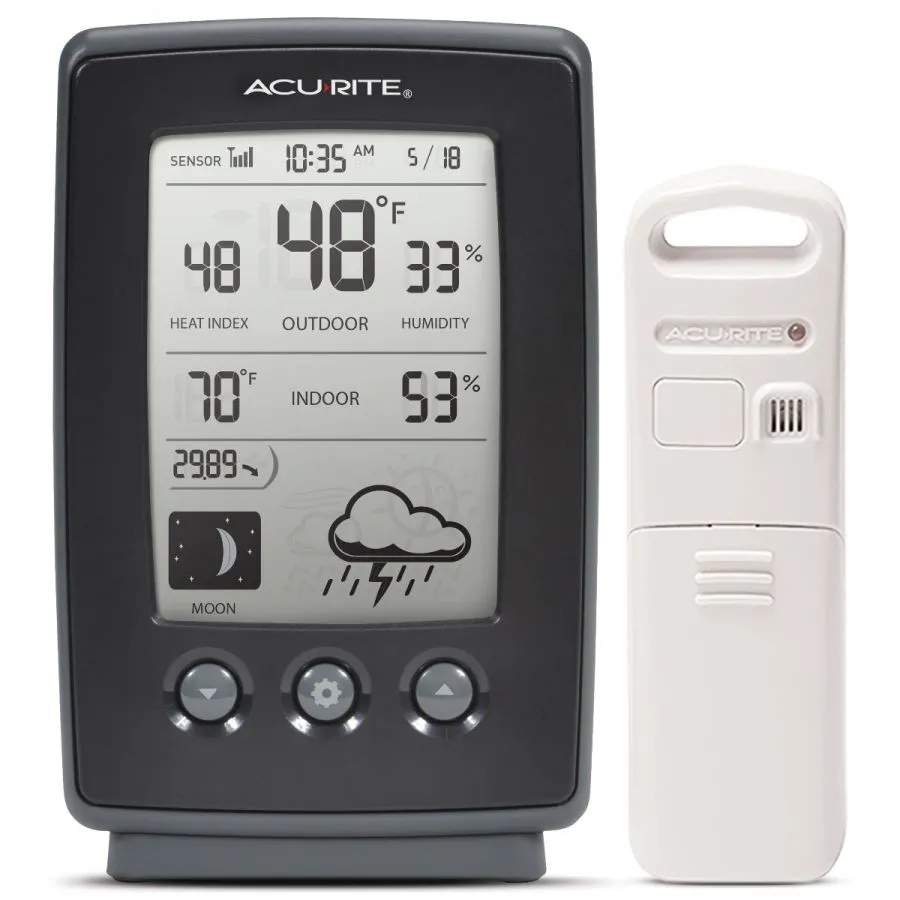
Product covered in this analysis
AcuRite 00829 Digital Weather Station
See today’s price, delivery options and customer reviews on Amazon.
As an Amazon Associate, I earn from qualifying purchases.
Review basis: research only. Everything below comes from the official AcuRite 00829 instruction manual and the 00829 listing on Amazon. We have not tested the 00829 ourselves, and no number on this page was measured by us. As an Amazon Associate I earn from qualifying purchases.
For more weather basics, visit our Weather Education page!
Weather Station Insights: Quick Facts
The four things most buyers want to know first, straight from AcuRite's manual.
Self-Calibrating Forecast
A 12 to 24 hour forecast icon that learns your local pressure over a 14 day Learning Mode.
Moon Phase & Clock
Intelli-Time clock that sets itself and changes for Daylight Saving Time.
Is the AcuRite 00829 Accurate? What AcuRite Actually Promises
Here is the honest part: the 00829 manual lists measuring ranges, but no accuracy figures (no "plus or minus" numbers for temperature or humidity). So we cannot tell you it is accurate to a certain degree, and you should be wary of any page that does.
What the manual does give you:
- Outdoor temperature: -40°F to 158°F (-40°C to 70°C)
- Indoor temperature: 32°F to 122°F (0°C to 50°C)
- Humidity: 1% to 99% RH
- Updates: outdoor readings every 16 seconds, indoor every 30 seconds
In practice, placement matters more than the spec sheet. AcuRite's own advice is to hang the sensor 4 to 8 feet above the ground, in permanent shade, with plenty of fresh air around it, and away from heat sources and vents. A sensor in afternoon sun will read the sun, not the air. (Like checking the temperature inside a parked car.)
If a reading still looks off once the sensor is in a good spot, the display lets you calibrate temperature, humidity and pressure yourself. See the setup section below, or our AcuRite calibration walkthrough.
Key Features: What the AcuRite 00829 Shows
According to the manual, the display shows:
- Indoor and outdoor temperature and humidity, plus one extra value you choose: heat index, dew point or frost point.
- Today's high and low records for indoor and outdoor temperature and humidity. These clear automatically at midnight, so this is a "today" memory, not a history log.
- Barometric pressure with a trend arrow (falling, steady or rising), in inHg or hPa.
- 12 to 24 hour forecast icon (sunny, partly cloudy, cloudy, light rain, snow, rain/snow mix, with windy and stormy variants).
- Intelli-Time clock and date: pre-programmed at the factory. You only pick your time zone and Daylight Saving Time setting.
- Moon phase in eight icons.
- Sensor signal strength and low battery indicators for both units.
What it does not do: no wind speed or direction, no rain gauge, no Wi-Fi, no app and no data history beyond today's highs and lows. The manual also does not mention a backlight, so do not count on reading it in a dark room. If wind or rain is on your wish list, look at a 5-in-1 style station in our home weather station reviews instead.
What Forecasts Does It Support? How the Self-Calibrating Forecast Works
The forecast is built from changes in barometric pressure. AcuRite calls this "Self-Calibrating Forecasting": during a Learning Mode the display studies pressure changes to work out your altitude. Here is the timeline from the manual:
- Day 1 to 14: a Learning Mode icon shows on the screen. Forecast and pressure are not reliable yet.
- After 14 days: the icon disappears and the forecast "should be fairly accurate".
- Up to 33 days: Learning Mode keeps calibrating in the background.
- Important: removing the batteries or resetting the display restarts Learning Mode from zero.
Two small things that save confusion. First, the icon predicts the next 12 to 24 hours, not what is happening right now, so a sun icon during a shower is not a fault. Second, the Amazon listing words it as a forecast "12 hours from your current conditions", while the manual says 12 to 24 hours. We go with the manual.
For storm warnings, a forecast icon is no substitute for official alerts. That is what a NOAA weather alert radio is for.
Who Is It For? Good Fits and Clear Skips
A good fit if you:
- want a simple indoor/outdoor temperature and humidity display with a forecast icon on a table or wall;
- do not want an app, an account or Wi-Fi setup;
- like a clock that sets itself and handles Daylight Saving Time.
Skip it if you:
- want wind or rainfall (it measures neither);
- want to check your readings on your phone or share data online;
- want weeks of history or graphs (records clear every midnight).
The display stands upright on a table or can be wall-mounted. The outdoor sensor has an integrated hanger, and AcuRite suggests a covered spot, such as under a well-covered tree branch, to extend its life.
From Box to Backyard: Setting Up the AcuRite 00829
In the box (per the manual): display unit with tabletop stand, outdoor sensor, instruction manual. AA batteries are not listed in the package contents, so plan on 5 AA batteries: 3 for the display and 2 for the sensor. A CR2032 coin cell for the clock memory is factory installed in the display. No mounting screws are listed.
Setup, step by step (from the AcuRite manual):
- Peel the protective film off the display screen.
- Slide the battery cover off the outdoor sensor and note the A-B-C switch inside. Set it to A, B or C.
- Insert 2 AA batteries in the sensor, following the +/- diagram. AcuRite recommends good alkaline or lithium batteries and says to use lithium below -4°F (-20°C). Heavy-duty and rechargeable batteries are not recommended. Replace the cover.
- Open the display's battery compartment and set its A-B-C switch to the same letter as the sensor. If the letters differ, the two units will not talk to each other.
- Insert 3 AA alkaline batteries in the display and close the cover.
- Press the SET button to enter set mode, then use the up and down buttons to set, in this order: time zone, Daylight Saving Time (on or off), hour, minute, month, date, year, temperature units (°F or °C) and pressure units (inHg or hPa). Press SET after each one. Set mode closes by itself after 30 seconds without a button press.
- Place the display indoors in a dry spot, at least 3 feet from TVs, computers, microwaves and other electronics.
- Hang the outdoor sensor 4 to 8 feet above the ground, in permanent shade with good airflow, within 330 feet of the display and away from large metal objects.
- Give the units a few minutes to synchronize (up to 20 minutes after a battery change).
- Leave the station running. After 14 days the Learning Mode icon disappears and the forecast is ready.
Calibration (optional): to adjust temperature or humidity, press and hold all three front buttons (up, SET and down) together for at least 5 seconds, change the flashing value with up or down, and confirm. For pressure, the manual first has you hold one button for at least 10 seconds to switch to manual pressure mode (the manual shows which one by its icon), then use the same three-button method. Calibrations are erased if you reset the display or remove its batteries.
If the outdoor temperature flashes or shows dashes (usually interference), the manual's fix is: bring both units indoors, take at least one battery out of each, check the A-B-C letters match, put the sensor battery back first, then the display battery, and let the two sit a couple of feet apart for about 20 minutes. More fixes in our AcuRite outdoor temperature not showing article.
Care: wipe both units with a soft, damp cloth (no harsh cleaners), and clear the display's ventilation ports now and then with a gentle puff of air.
Want to see one in real life? Here is a third-party review video of the 00829 by Zenfento:
Product Specifications at a Glance
| Feature | Specification (AcuRite manual) |
|---|---|
| Forecast | Self-Calibrating, 12 to 24 hours; 14 day Learning Mode |
| Temperature Range | Outdoor: -40°F to 158°F, Indoor: 32°F to 122°F |
| Humidity Range | 1% to 99% RH |
| Accuracy | Not stated in the manual |
| Updates | Outdoor every 16 seconds, indoor every 30 seconds |
| Wireless Range | Up to 330 ft (100 m), depending on home construction |
| Frequency | 433 MHz |
| Power | Display: 3 x AA alkaline; Sensor: 2 x AA alkaline or lithium; CR2032 for clock memory (factory installed) |
| Measures wind or rain? | No |
| Wi-Fi / app | No |
| Warranty | 1 year limited (registration required) |
Proven vs. claimed: every number in this table is AcuRite's own specification. None of it was measured independently by us.
Ready to check it out? The button goes to the AcuRite 00829 (Black) listing on Amazon: check the current price on Amazon. Remember the 5 AA batteries.
As an Amazon Associate I earn from qualifying purchases.
Review basis: the official AcuRite 00829 instruction manual (linked from the Amazon listing) and the AcuRite 00829 listing on Amazon (B00GLDQH5W), plus a third-party review video by Zenfento on YouTube (above). We have not physically tested the AcuRite 00829 ourselves. Research last verified: 24 October 2026.
Read more about how we research.
Update Log
- : rewritten from the AcuRite manual. Removed accuracy figures that are not in the manual, fixed the Amazon button (it pointed to a different product), added full setup, calibration and troubleshooting steps and a what-it-does-not-do list.
Ready to decide?
Get the AcuRite 00829 Digital Weather Station
Prices and stock change daily. Check the current price, delivery options and what owners say in their reviews.
In this reviewAcuRite 00829 Digital Weather StationToday's price, delivery & owner reviews on Amazon
Check on Amazon →