As an Amazon Associate, I earn from qualifying purchases.
In this article 9 sections
How to Calibrate a Hygrometer With the Salt Test (Step by Step)
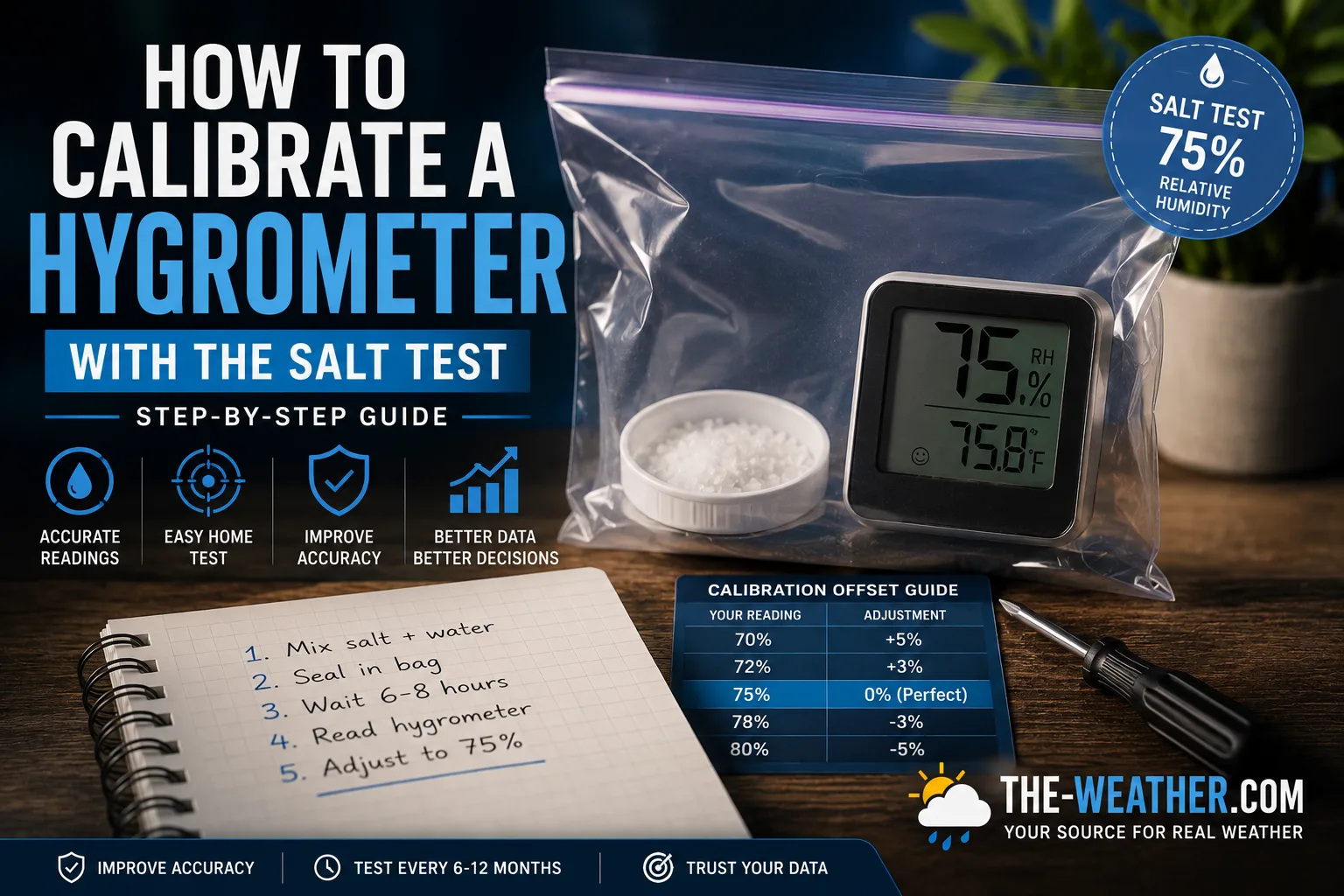
Hygrometers drift over time. A sensor that read accurately when new can be off by several percentage points after a year of use, particularly in high-humidity environments. The salt test, technically known as the saturated salt solution method, is the standard home calibration technique. It uses a physical property of table salt to create a approximately 75% relative humidity level you can compare your hygrometer against.
This method is referenced by manufacturers including Ambient Weather as the standard home accuracy test for humidity sensors. It requires no specialist equipment, only salt, water, and a zip-lock bag.
What You Need
- Plain table salt (sodium chloride)
- Water
- Small bottle cap or jar lid
- Sealable zip-lock bag
- Your hygrometer
- Small screwdriver (analog hygrometers)
- Second zip-lock bag (extra seal security)
- Paper towel (to absorb excess water if needed)
- Thermometer (to confirm stable temperature)
Total time: 10 minutes preparation + 6–8 hours waiting. You do not need to be present during the waiting period.
Comparing hygrometers? Our overview of the best hygrometers for every room puts the picks for bedrooms, basements, grow tents and humidors side by side.
Step-by-Step Instructions
Mix salt and water to wet sand consistency
Place a teaspoon of plain table salt in a small bottle cap or jar lid. Add a few drops of water, just enough to make the salt damp without dissolving it. The mixture should look and feel like wet sand with no standing water visible.
Place everything in a sealed zip-lock bag
Put the bottle cap with the salt mixture inside a sealable zip-lock bag. Place your hygrometer in the same bag: keep the hygrometer sensor away from direct contact with the salt mixture. Do not squeeze air out of the bag: the trapped air is what the humidity stabilises in. Seal the bag completely. If the bag seal is in any doubt, place the sealed bag inside a second bag.
Leave sealed for at least 6–8 hours
Place the sealed bag somewhere with a stable temperature, ideally around 68–72°F (20–22°C), away from direct sun, heating vents, and windows. Leave it completely undisturbed. Do not open the bag during the waiting period. Overnight is the most practical approach: 8 to 12 hours gives reliable stabilisation for the vast majority of consumer hygrometers.
Some slower-responding hygrometers may need up to 24 hours. If you are calibrating multiple hygrometers at the same time, they can all go in the same bag: the salt test works for any number of sensors simultaneously.
Read the hygrometer without opening the bag
After at least 6 hours, read the humidity display on your hygrometer without opening the bag. The correct reading should be 75% relative humidity. Note the reading and calculate the difference from 75%.
| Your reading | Difference from 75% | Your offset | What to do |
|---|---|---|---|
| 75% | None | 0% | No adjustment needed ✓ |
| 72% | 3% low | +3% | Add 3% to all future readings |
| 69% | 6% low | +6% | Add 6% to all future readings |
| 78% | 3% high | -3% | Subtract 3% from future readings |
| 80% | 5% high | -5% | Subtract 5% from future readings |
Adjust your hygrometer
Remove the hygrometer from the bag and adjust it using one of these methods depending on your model:
- Digital hygrometer with calibration button: Press and hold the calibration button (often labelled CAL) until the display flashes, then adjust to 75% using the + and - buttons. Refer to your manual for your specific model: the exact button sequence varies.
- Digital hygrometer with app offset: Enter the offset value in the app settings. For example if your hygrometer read 70% during the test, enter +5% as the offset. Some models including the ThermoPro TP50 do not support calibration: check your manual before attempting adjustment.
- Analog hygrometer: Locate the small adjustment screw on the back of the unit, typically accessible through a small hole in the rear plate. Use a jeweller's flat-head screwdriver to move the needle to 75%.
- Non-adjustable hygrometer: Note the offset and apply it manually to all readings. A sticky note on the unit with "+4%" or "-3%" is a practical reminder.
Calibration Success Checklist
- Salt mixture was damp with no standing water
- Bag sealed completely with no air removed
- Left undisturbed for at least 6 hours
- Reading taken without opening the bag
- Offset noted or hygrometer adjusted to 75%
- Calibration date noted: set a reminder to recalibrate in 12 months
Common Mistakes During the Salt Test
Most failed salt tests come down to one of six errors. Recognising them before you start saves you from a wasted 8 hours and a false calibration result.
The most common mistake. Adding too much water dissolves all the salt crystals, turning the paste into a liquid solution. A dissolved solution is no longer saturated, so the reference humidity drops below 75%. The mixture must look like wet sand: clumped and damp, not liquid. If it becomes a puddle, add more dry salt until undissolved crystals are visible.
The humidity inside the sealed container needs time to equilibrate. Opening it before the full 6–8 hours, even briefly to check the reading, resets the process. Read the hygrometer display through the bag or take a photo of the app reading before opening. If you must check, seal it again and wait another 2 hours minimum.
Direct contact between the salt solution and the sensor can damage the capacitive element and cause permanent calibration errors. The salt paste provides the reference humidity through evaporation inside the sealed space: physical separation is essential. Use a separate small dish or bottle cap for the paste, not just loose salt on the bottom of the same container as the sensor.
The 75% RH reference applies at normal room temperature (65–77°F / 18–25°C). Sunlight or a nearby radiator can raise the temperature inside the sealed container significantly, shifting the equilibrium humidity. Place the container on a shaded surface at consistent room temperature for the full test period.
A zip-lock bag with a weak seal or a container with a loose lid allows ambient air to mix with the test environment, preventing the humidity from reaching 75%. Press all air out of the zip-lock bag before sealing and run a fingernail along the seal to confirm it is closed fully. A small airtight plastic food container with a snap-fit lid is more reliable than a zip-lock bag if you have one available.
Some sensors take longer to equilibrate than others, particularly those in larger enclosures or with slower response times. If you check at 4 hours and get an unexpected reading, seal the container and wait the full 8 hours before concluding the sensor is out of calibration. Larger airtight containers also take longer to equilibrate than small zip-lock bags.
Reading and Applying the Result
| Salt Test Reading | Offset | Verdict | Action |
|---|---|---|---|
| 73–77% | ±2% | Excellent | No adjustment needed for most applications |
| 72% or 78% | ±3% | Acceptable | Apply offset in app if available; note variance if not |
| 70–71% or 79–80% | ±4–5% | Marginal | Apply offset correction: important for precision use |
| Below 70% or above 80% | More than ±5% | Poor | Apply maximum offset available; consider replacing the sensor |
How to apply the offset in app-supported sensors
For sensors that support calibration, Govee H5179, SensorPush HT1, Inkbird IBS-TH2, the process is straightforward. Open the app, navigate to device settings or calibration, and enter the offset value. The app applies it to all future readings automatically. You do not need to repeat the salt test unless you notice readings drifting again.
What to do if your sensor has no calibration function
Sensors like the ThermoPro TP62 and TP50 have no in-app calibration. In that case, note the offset and apply it mentally: if the sensor reads 3% high, subtract 3% from every reading you take. Write the offset on a sticky note and attach it to the sensor so you do not forget.
Troubleshooting: My Hygrometer Still Won't Read 75%
If you ran the test correctly and your hygrometer is reading far from 75%, work through these causes before concluding the sensor is faulty.
- Low battery: A weak battery is the most common cause of erratic readings that appear after previously normal operation. Replace the battery and repeat the salt test before doing anything else.
- Poor seal on the container: If ambient room humidity is significantly different from 75%, a leak in the bag or container can pull the internal reading toward room conditions. Check the seal and repeat with a tighter container.
- Insufficient wait time: Some sensors need the full 8 hours. If you checked at 6 hours, seal the container and wait another 2 hours.
- Salt paste too dry or too wet: If the paste dried out during the test or was too liquid to start, the reference humidity may not have been stable. Prepare a fresh paste and repeat.
- Old or aged sensor: Capacitive sensors that have been exposed to sustained high humidity (above 85% for weeks or months) can drift beyond the range of in-app calibration correction. A variance of more than ±8% after a correct salt test suggests the sensor may need replacing.
- Damaged sensor: Physical damage from condensation or liquid contact, particularly if the sensor was once directly wetted, can cause permanent inaccuracy. There is no calibration fix for a damaged capacitive element.
- Temperature outside normal range: If the room was colder than 59°F (15°C) or warmer than 82°F (28°C) during the test, the 75% reference shifts slightly. Re-run the test at a stable room temperature between 65–77°F (18–25°C).
Why Table Salt Creates 75% Humidity
A saturated sodium chloride (table salt) solution in a sealed environment produces a stable relative humidity of approximately 75% RH at typical room temperatures. This is a well-established physical property of saturated salt solutions: the water vapour pressure above the solution is lower than pure water, creating a predictable equilibrium humidity of approximately 75% RH that does not change as long as undissolved salt crystals remain present.
The 75% value is stable enough for consumer hygrometer calibration purposes between approximately 59°F and 86°F (15°C to 30°C). At temperatures outside this range the equilibrium humidity shifts slightly, for most home calibration purposes this difference is smaller than the hygrometer's own accuracy tolerance and does not affect the practical result.
How Often to Calibrate
Living rooms, bedrooms, and offices with typical humidity levels cause slow drift. Annual calibration is sufficient.
Higher average humidity accelerates sensor drift. Twice-yearly calibration maintains accuracy.
High sustained humidity and temperature fluctuations cause faster drift in grow environment sensors.
Cigar storage is humidity-sensitive. More frequent calibration protects expensive inventory.
Typical indoor humidity levels. Annual calibration is sufficient for comfort monitoring.
Some firmware updates reset calibration offsets. Recalibrate after any firmware change on digital hygrometers.
Which Hygrometers Support Calibration
Not all hygrometers allow you to adjust their readings. Here is what we know from official documentation for models reviewed on this site:
- ThermoPro TP62: supports calibration via offset adjustment. Check your manual for the specific button sequence.
- ThermoPro TP50: does not support calibration per official ThermoPro support documentation. Note your offset and apply manually. Note: ThermoPro rebranded to TempPro in 2026: check the current brand website if the above link changes.
- Govee H5179: supports in-app calibration offset adjustment via the Govee Home app.
- SensorPush HT1: supports calibration via the SensorPush app.
- Inkbird IBS-TH2: supports in-app calibration offset.
For any hygrometer not listed above, check your product manual or manufacturer support page for calibration instructions specific to your model.
Frequently Asked Questions
Why does the salt test create exactly 75% humidity?
A saturated sodium chloride solution in a sealed environment produces approximately 75% relative humidity at room temperature. This is a stable physical property of saturated salt solutions used in laboratory and consumer calibration. The value is consistent enough for home hygrometer calibration at typical indoor temperatures.
How long should I leave the hygrometer in the salt test bag?
A minimum of 6 to 8 hours. Overnight, 8 to 12 hours, is ideal for most consumer hygrometers. Some slower-responding sensors may need up to 24 hours to fully stabilise. Do not open the bag during the waiting period.
What if my hygrometer does not have a calibration button?
Note the difference between your reading and 75%: this is your offset. Apply it manually to all future readings. For example, if your hygrometer reads 69% during the test, it reads 6% low: add 6% to all future readings. Some apps allow you to enter a manual offset even if the device has no calibration button.
How often should I calibrate my hygrometer?
Once a year for standard home use. Every 3 to 6 months for hygrometers in high-humidity environments like basements, grow tents, and cigar humidors where sensors drift faster. Recalibrate immediately after any firmware update that may have reset your offset.
Can I calibrate multiple hygrometers at the same time?
Yes. Place all hygrometers in the same sealed bag with the salt mixture. The 75% humidity environment applies equally to all sensors. This is the most efficient way to calibrate several units at once.
Our hygrometer roundups cover home, basement, grow tent, baby room, and cigar humidor use cases: all with calibration support noted for each model.
Sources
Salt test method referenced by Ambient Weather official support documentation. Calibration support status for ThermoPro TP50 from official ThermoPro support documentation. Saturated salt solution humidity values from published physical chemistry references. Calibration frequency recommendations based on manufacturer guidance and common owner practices. No manufacturer compensation received.

Lena Thornton
Weather Station Analyst & CWOP Contributor. Lena has researched, reviewed and analysed hygrometers and weather stations from ThermoPro, Govee, SensorPush, Inkbird, AcuRite, and Ambient Weather. Published June 2026.