As an Amazon Associate, I earn from qualifying purchases.
In this article 6 sections
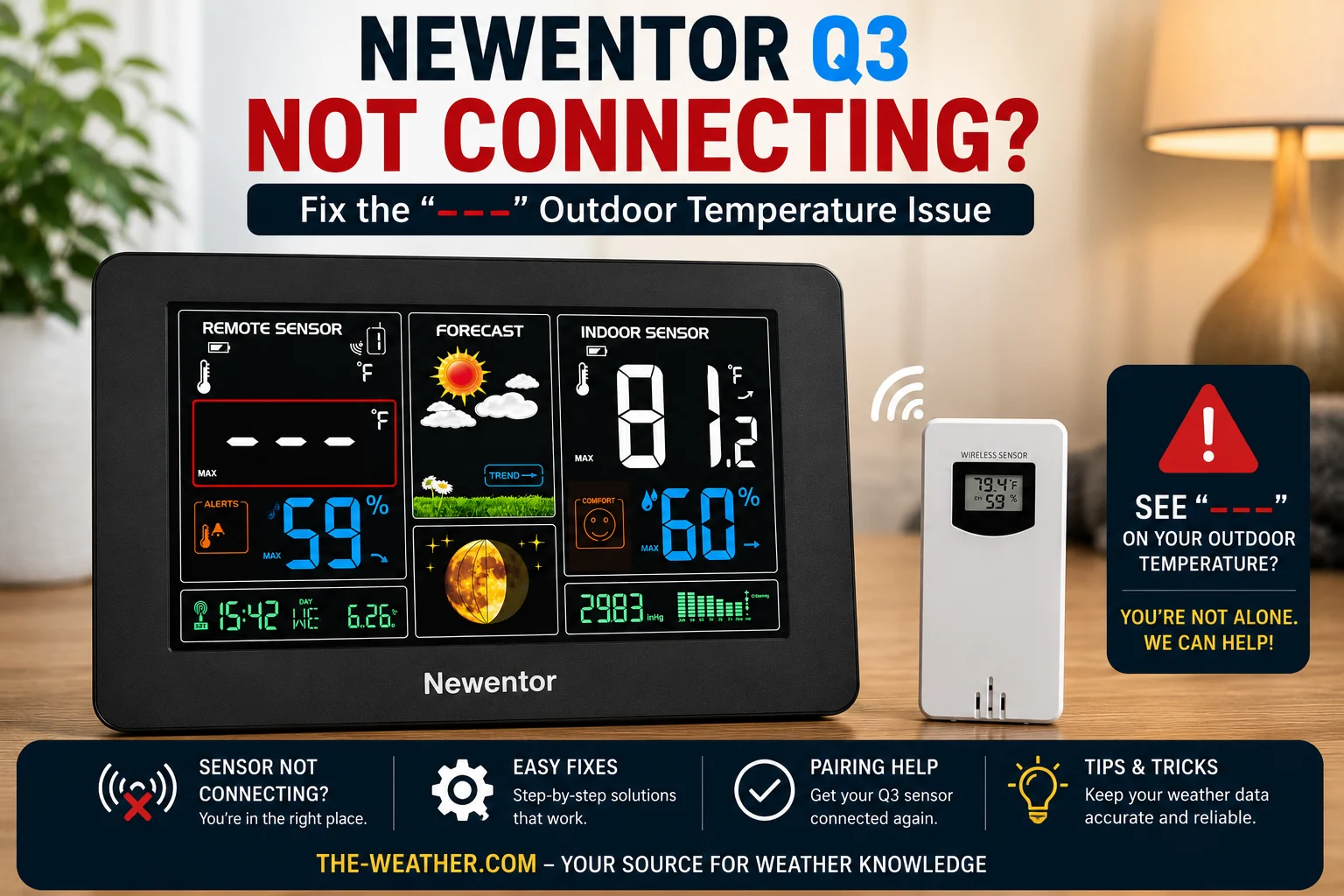
Dashes in the outdoor area mean the Q3 display has lost the wireless signal from the outdoor sensor: almost always caused by a channel mismatch, depleted batteries, or a link that needs re-establishing.
The dashes problem on the Newentor Q3 is one of the most frequently searched questions about the station, and it almost always has one of three causes: a channel mismatch between the sensor and display (especially after battery replacement), depleted sensor batteries, or a wireless link that needs to be re-established after a power interruption.
All fixes on this page are sourced from Newentor's official support documentation and Amazon Q&A responses from their customer service team. For the full Q3 review and specs see the Newentor Q3 review page. For first-time setup see the Q3 setup walkthrough.
What Causes the Outdoor Sensor to Stop Connecting
A common cause after battery replacement. The sensor and display must be on the same channel (1, 2, or 3). Fix: match channels on both units before pairing.
The outdoor sensor draws power continuously. Batteries typically last several months depending on temperature and transmission frequency. Depleted batteries are among the most common causes of connection failures. Fix: install fresh AA alkaline batteries.
A power interruption can occasionally interrupt the wireless connection and require the units to re-establish communication. Fix: manual pairing procedure (Fix 3).
Maximum range is 200 ft in open air. Metal siding, stucco, concrete, and certain glass types can significantly reduce effective range. Fix: test indoors first, then move gradually.
Low temperatures degrade battery performance, reducing both range and transmission frequency. Fix: move sensor closer to display in winter, or consider fresh alkaline batteries rated for cold.
The 5 Fixes: In Order
- Open the battery compartment on the outdoor sensor
- Remove old batteries and inspect contacts for corrosion: clean with a dry cloth if needed
- Install two fresh AA alkaline batteries according to the polarity diagram
- The sensor LED should flash approximately every 60 seconds to confirm it is transmitting
- Wait 2 to 3 minutes to see if the outdoor reading appears on the display
Per Newentor's official support documentation, the display console and outdoor sensor must be set to the same channel (1, 2, or 3) before pairing will work. A channel mismatch after battery replacement is one of the more frequent causes of no signal.
- On the display console, press the DOWN button to check the currently selected channel: it will show a number (1, 2, or 3) next to the remote sensor indicator
- Open the outdoor sensor battery compartment
- Locate the channel button (marked 1, 2, 3) and press it to select the matching channel
- Both units must show the same channel number
- After matching channels, proceed to Fix 3 to complete pairing
This is Newentor's own recommended fix from their official Amazon Q&A: it re-establishes the wireless link without a full reset.
- Bring both units indoors and place them 5 to 10 feet apart with nothing between them
- Confirm both are on the same channel (Fix 2 above)
- On the display, press and hold the DOWN button to start searching for the outdoor signal: the outdoor area will indicate it is scanning
- On the outdoor sensor, press the TX button (inside the battery compartment) to send a manual signal
- Wait 2 to 3 minutes for the outdoor temperature and humidity to appear
Per Newentor's official Amazon support team response: remove all batteries and unplug the power adapter, wait 10 minutes, then re-pair from scratch.
- Unplug the AC adapter from the display console
- Remove the backup batteries from the display
- Remove the batteries from the outdoor sensor
- Wait at least 10 minutes with both units fully unpowered
- Install fresh batteries in the outdoor sensor first: wait for the LED to flash
- Plug in the AC adapter on the display and install backup batteries
- Do not press any buttons for several minutes: allow the display to search for and connect to the sensor automatically
- If automatic pairing does not occur, run the manual pairing in Fix 3
The Newentor Q3 outdoor sensor has a maximum range of 200 feet in open air. Per Newentor's official guidance, the following materials can significantly reduce that range:
- Metal siding: strong signal blocker
- Stucco walls: contains wire mesh that attenuates wireless signals
- Concrete and brick: dense materials reduce range considerably
- Certain types of glass, particularly insulated or low-emissivity glass
- Confirm pairing works indoors at close range (Fix 3) before mounting outdoors
- Move the display to a window or wall closer to the outdoor sensor location and test again
- Mount the sensor on a wall with fewer obstructions between sensor and display
- Avoid placing the display near microwaves, cordless phones, or other wireless devices that can cause interference
Troubleshooting Flowchart
Follow this sequence from top to bottom: stop as soon as outdoor temperature appears on the display.
Quick Diagnosis: Which Fix to Try First
If None of the Fixes Work
If all five fixes have been attempted and the outdoor sensor still shows dashes, contact Newentor directly at service@newentor.com. Per their published policy, units that fail to work as described within the warranty period are eligible for replacement: verify current terms on their website before contacting support.
If the sensor is several years old and has been exposed to rain, freezing temperatures, or standing water for extended periods, transmitter failure becomes increasingly likely. In that case, a replacement outdoor sensor compatible with the Q3 can be ordered: search for the compatible sensor ASIN on Amazon or contact Newentor support to confirm the correct replacement part for your specific unit.
Frequently Asked Questions
Why is my Newentor Q3 showing dashes for outdoor temperature?
Dashes mean the display has lost the wireless signal from the outdoor sensor. Common causes include a channel mismatch, depleted sensor batteries, or a link needing re-establishment after a power interruption. Start with Fix 2 (channel match), then Fix 1 (fresh batteries), then Fix 3 (manual pairing).
How do I reset the Newentor Q3 outdoor sensor?
For manual pairing: press and hold the DOWN button on the display to start searching, then press the TX button on the outdoor sensor and wait 2 to 3 minutes. For a full reset: remove all batteries from both units and unplug the AC adapter, wait 10 minutes, install fresh batteries in the sensor first, then restore display power, and allow several minutes for automatic pairing.
What channel should the Newentor Q3 outdoor sensor be on?
The outdoor sensor has a channel button inside the battery compartment: press it to select Channel 1, 2, or 3. The display must show the same channel number. Press the DOWN button on the console to check or change the display channel. A mismatch after battery replacement is one of the most common causes of no signal.
Why does my Newentor Q3 lose signal in cold weather?
Cold temperatures degrade battery performance, which reduces both transmission power and range. Per Newentor's official guidance, moving the sensor closer to the display during cold periods can help. Installing fresh alkaline batteries, which perform better at low temperatures than older cells, is also recommended before attempting re-pairing in winter conditions.
Related Newentor pages
Research Note
The channel setting after a battery change and the 10-minute full reset are the two fixes Newentor's own answers point to first. All fixes on this page are sourced from Newentor's official Amazon Q&A responses and manufacturer documentation.

Lena Thornton
Weather Station Analyst & CWOP Contributor. Lena researched, reviewed and analysed Newentor Q3 connectivity issues using official Newentor support documentation, Amazon Q&A responses. Updated July 2026.