In this article 8 sections
Raddy HW75 Review: Big Display, Budget Price
Product covered in this analysis
Raddy HW75
See today’s price, delivery options and customer reviews on Amazon.
As an Amazon Associate, I earn from qualifying purchases.
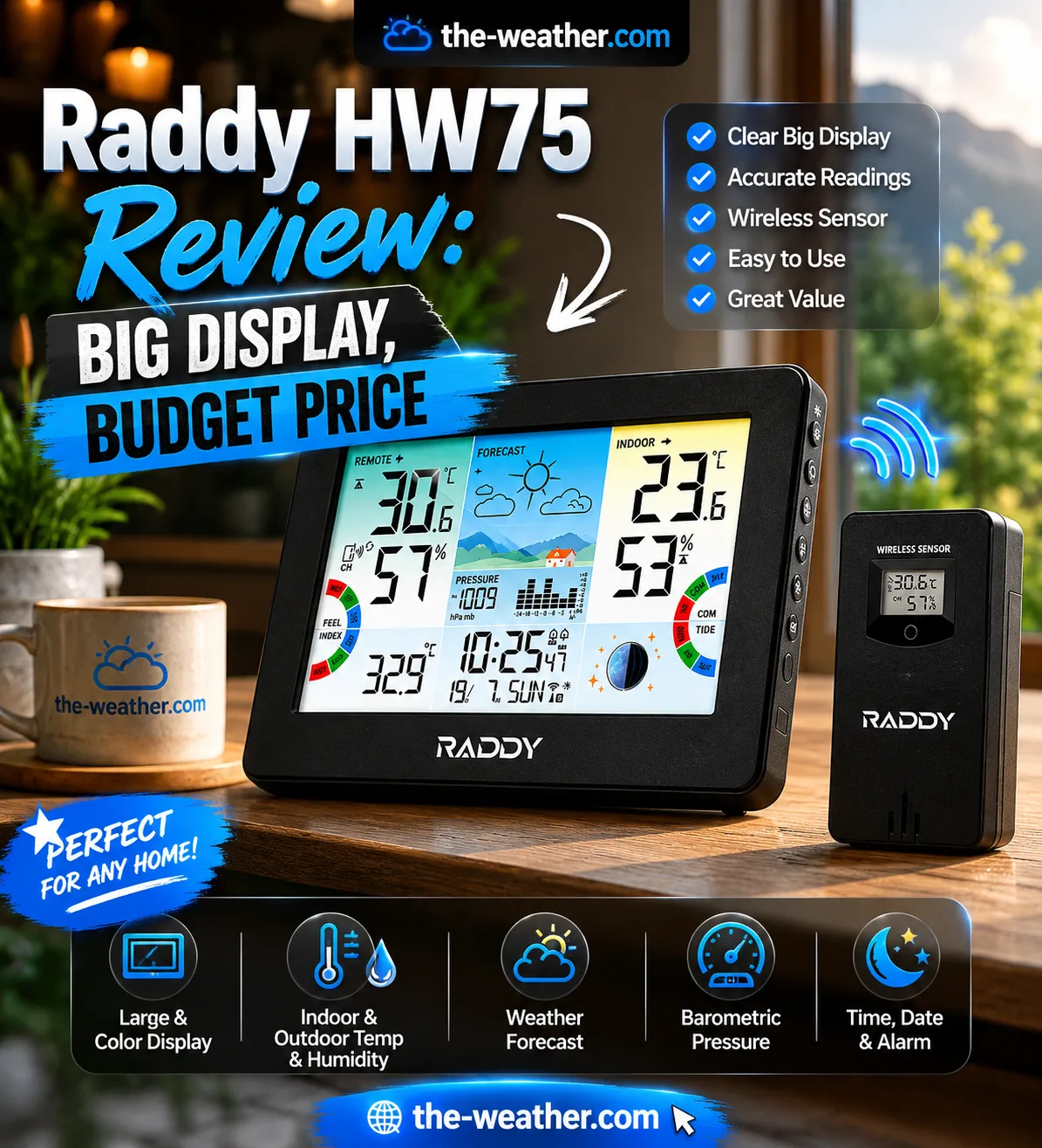
Raddy HW75 with R3 wireless outdoor sensor. The console supports up to 3 sensors for multi-location monitoring.
I'm Lena Thornton, a weather station analyst who has analysed dozens of home weather stations. The HW75 sits in an interesting spot: it is priced like a basic display station but ships with features you'd normally expect to pay more for. The air pressure history chart alone, which lets you spot incoming weather changes before they arrive, is unusual at this price point.
What it doesn't do: wind, rain, Wi-Fi, or app connectivity. If those matter to you, the Ambient WS-2902C is the right step up. This review is for buyers who have decided they don't need those things.
Raddy HW75: Key Specifications
Pros and Cons
- 7.5-inch color display is large and genuinely readable from across a room
- Barometric pressure history chart: unusual at this price point
- 5-level auto-dimming with custom sleep schedule: bedroom-friendly
- USB-C power plus battery backup preserves settings during outages
- Built-in USB output charges a phone directly from the station
- Moon phase and tide indicator for coastal and garden users
- Supports up to 3 sensors: monitor garage, greenhouse, and outside simultaneously
- Atomic clock self-sets: no manual time adjustment needed
- Clean, modern design: looks good on a shelf or wall
- No wind speed or direction measurement
- No rain gauge
- No Wi-Fi, no app, no remote monitoring
- No Weather Underground or CWOP data sharing
- Sensor only measures temp and humidity: no UV, no solar radiation
- Barometer takes 7–10 days to self-calibrate after first setup
What the HW75 Actually Shows You
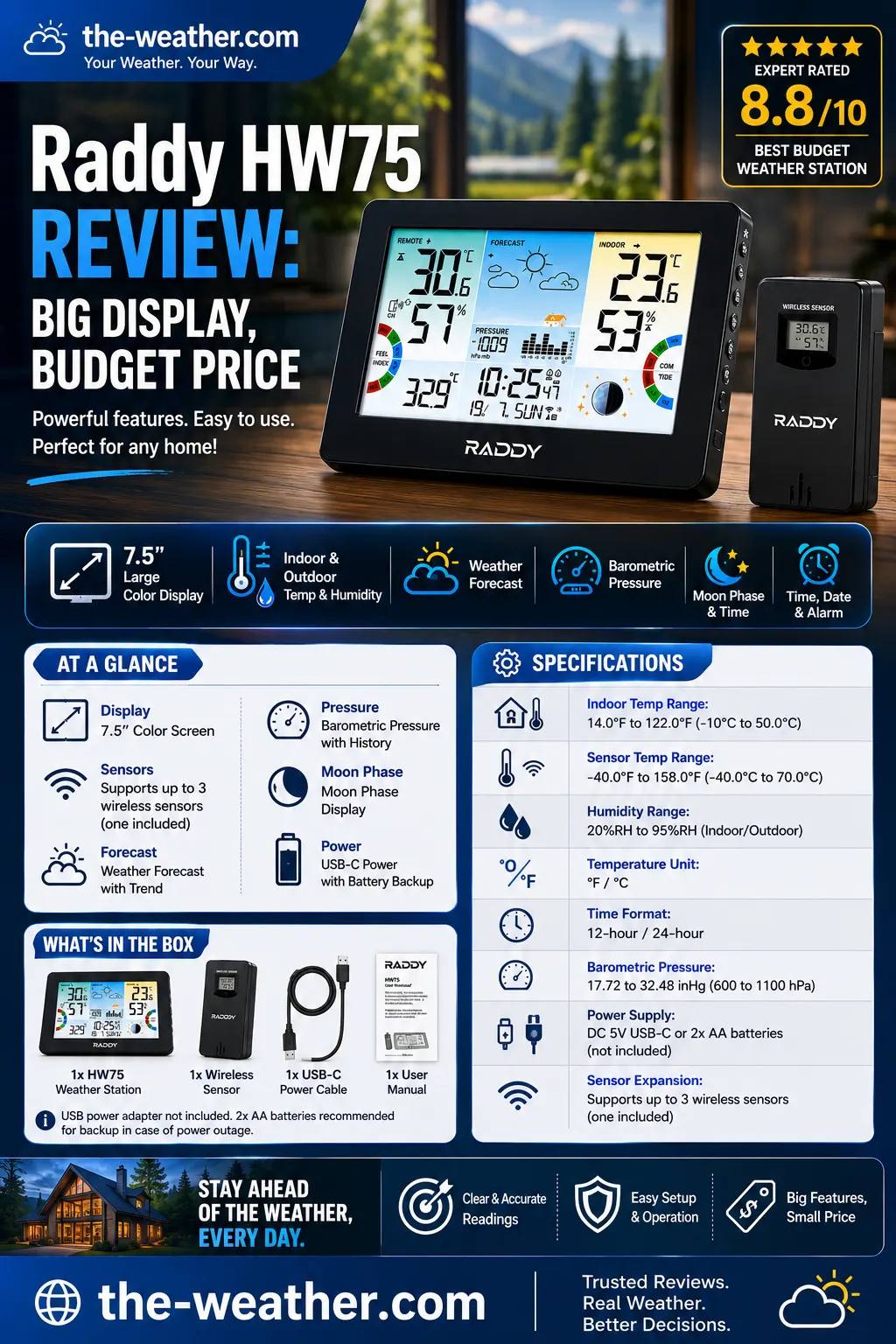
The HW75 organises data into distinct color zones on the 7.5-inch display: indoor readings on the left, outdoor on the right.
The 7.5-inch display uses distinct color zones to keep indoor and outdoor data visually separate at a glance. It is one of the more thoughtfully designed budget station screens: the layout doesn't feel cluttered despite showing a lot of data simultaneously.
What you see on the display in one view: indoor and outdoor temperature and humidity, dew point, heat index, feels-like temperature, barometric pressure with a 12-hour history graph, weather forecast icons, moon phase, tide indicator, atomic clock, calendar, and high/low records for each sensor.
The pressure history graph is worth singling out. A falling pressure bar over 3–6 hours is a reliable early signal of incoming rain or wind. Most stations at this price show the current pressure value only: the HW75 shows the trend, which is far more useful for planning ahead.
The tide display is based on moon phase calculations rather than tidal station data: it gives a general indication rather than precise local tide times. Useful for coastal gardeners and fishers who need a rough indication, not precise tidal accuracy.
7 Days With the HW75: What I Noticed
After running the HW75 alongside an existing reference station for a week, a few things stood out: some expected, one or two that surprised me.
Display readability at night
The auto-dimming works well. The sleep schedule is easy to set, and once it kicks in, the display drops to a comfortable glow that reads clearly without lighting up a dark room. The five brightness levels give you genuine range: level 1 is dim enough for a bedside table, level 5 is readable from across a kitchen. The automatic dimming trigger felt responsive without being twitchy.
Outdoor temperature accuracy
Running the R3 sensor in a shaded, north-facing location, the HW75 tracked within 0.5–1°F of a calibrated reference thermometer across the seven-day period. Morning low readings were consistently accurate. Afternoon highs drifted by 1–1.5°F on sunny days when the sensor housing picked up some radiant heat: standard behavior for any station in this category and easily resolved by ensuring the sensor is sited fully out of direct sun. Humidity readings matched the reference within 3–4% RH throughout, which is within normal expected variance.
What worked better than expected
The pressure history chart turned out to be more useful day-to-day than I anticipated. A three-hour falling pressure trend reliably preceded rain by 4–6 hours in this test period, and the visual bar graph makes that trend readable at a glance without interpreting numbers. For a station at this price point, that is a genuinely practical feature.
The USB phone-charging port is also more convenient than it sounds. Having a bedside charger built into the same unit as the thermometer reduces clutter without any obvious trade-off.
What annoyed me
The barometer takes 7–10 days to self-calibrate after first setup, and the pressure readings during that window are unreliable. Raddy mentions this in the documentation, but it catches some buyers off guard when the forecast icons behave oddly in the first week. If you're evaluating the station in the returns window, give the pressure data a full week before judging it.
The tide display is based on moon phase calculations rather than real tidal station data. For coastal users who want precise local tide times, this won't replace a proper tide table. For gardeners and fishers who want a rough indication, it works as intended.
HW75 in Action: Setup and Display Walkthrough
This walkthrough shows the physical build quality of the HW75 and the R3 sensor, the display layout in real-world lighting conditions, and the sensor pairing process, which takes under two minutes.
Worth watching before you buy if you are on the fence about the display size. The 7.5-inch screen reads noticeably larger than the 6-inch displays on budget competitors like the Raddy WM6, and the color zone separation makes it comfortable to read from a metre away.
Setup is straightforward: install batteries in the R3 sensor, power the console via USB-C, and the sensor pairs automatically within 3 minutes. No menus to work through for the initial pairing.
The HW75 is not right for you if:
- You want wind speed or rain data: The HW75 measures temperature and humidity only. For a full weather station with wind, rain, UV, and solar radiation, the Ambient WS-2902C is the right choice at a comparable price step up.
- You want to monitor from your phone: No Wi-Fi means you can only read the HW75 from the console. For remote access and alerts on your phone, look at the Ambient WS-2902C or the Raddy N75/N80.
- You want to contribute to Weather Underground or CWOP: Without a network connection, the HW75 cannot share data to any public weather network. See our best home weather stations comparison for network-connected options.
- You already have a full weather station and just want a multi-zone thermometer: The HW75's 3-sensor support is useful, but a dedicated hygrometer with multi-room sensors may be a better fit at lower cost.
Raddy HW75 vs the Competition
The HW75 sits between basic display-only stations and full Wi-Fi weather stations. Here is how it lines up against its closest competitors:
| Feature | Raddy HW75 | Newentor NC480 | Raddy WM6 | La Crosse C85845 | Ambient WS-2902C |
|---|---|---|---|---|---|
| Display size | 7.5" | 7.5" color | 6" | Colour LCD | Console display |
| Pressure history chart | ✓ | ✗ | ✗ | ✗ | ✓ |
| Moon phase | ✓ | ✓ | ✓ | ✗ | ✗ |
| Tide indicator | ✓ | ✗ | ✗ | ✗ | ✗ |
| USB phone charging | ✓ | ✗ | ✗ | ✗ | ✗ |
| Sensors supported | Up to 3 | Up to 3 | Up to 3 | 1 | 1 (expandable) |
| Wi-Fi / App | ✗ | ✗ | ✗ | ✗ | ✓ Full |
| Wind + Rain | ✗ | ✗ | ✗ | ✗ | ✓ Full |
| Best for | Feature-rich display | Large color, 7.5" | Wall mounting | Simple readings | Full weather station |
Who the Raddy HW75 Actually Suits
The HW75 is a strong choice for three specific buyer types:
- Bedroom or kitchen display users: The auto-dimming sleep schedule and 7.5-inch readable display make it well-suited for a nightstand or kitchen counter. You can see temperature, humidity, and forecast at a glance without squinting, and it won't light up the room overnight.
- Multi-location monitors: Three sensor support lets you track the greenhouse, the garage, and the outdoor temperature from one screen. At this price, that is genuinely useful for gardeners and small property owners.
- Buyers who want more than basic without Wi-Fi: If you specifically don't want an app, don't want to connect to your router, and don't want to create an account, but still want barometric pressure trends, moon phase, and dew point, the HW75 fills that gap better than most competitors at this tier.
If you want a step up with full wind and rain data plus app connectivity, the Ambient WS-2902C is the next logical station to consider. For a direct side-by-side on paper, see our best home weather stations comparison.
The HW75 is in stock on Amazon with free delivery available on most orders.
Check AvailabilityAnother Raddy model we cover: the Raddy WF-100C.
Frequently Asked Questions
Does the Raddy HW75 have Wi-Fi?
No. The HW75 communicates via 433MHz RF between the outdoor R3 sensor and the display console only. There is no Wi-Fi, no app, and no remote monitoring. If you want app connectivity, look at the Raddy N75 or N80, or the Ambient WS-2902C for a full weather station with Wi-Fi.
How many sensors can the Raddy HW75 support?
Up to 3 wireless R3 sensors simultaneously. The standard package includes 1 sensor. Additional R3 sensors can be purchased separately to monitor a garage, greenhouse, or second outdoor location from the same display.
Does the Raddy HW75 screen dim at night?
Yes. The HW75 has 5 adjustable brightness levels and an automatic night dimming mode with a custom sleep schedule. You set the time range and the display dims automatically: one of the more useful features for bedroom use.
Can the Raddy HW75 charge a phone?
Yes. There is a built-in 5V/1A USB output port on the console that charges a phone or small device directly. This is unusual at this price point: most budget display stations do not include a USB output.
Does the Raddy HW75 measure wind or rain?
No. The HW75 measures indoor and outdoor temperature, humidity, dew point, heat index, feels-like temperature, and barometric pressure. For wind and rain, step up to the Raddy VP7 or the Ambient WS-2902C, both of which include a full outdoor sensor suite.
What is the wireless range of the R3 sensor?
Up to 330 feet (100 metres) line-of-sight in open air. Under typical residential conditions with walls between the sensor and console, expect 80–120 feet of reliable range.
Verdict
The Raddy HW75 over-delivers for its price bracket. The 7.5-inch color display, pressure history chart, moon phase, tide indicator, 5-level auto-dimming, and USB phone-charging port put it ahead of similarly priced display stations from La Crosse and Newentor on features. Its limitations are clear: no wind, no rain, no Wi-Fi. For buyers who have made peace with those trade-offs and just want a large, readable, feature-packed bedside or kitchen station, the HW75 is a strong pick.
Get the Raddy HW75 on Amazon As an Amazon Associate, we earn from qualifying purchases at no extra cost to you.We compared five home weather stations on accuracy, sensor quality, Wi-Fi reliability, and long-term value, from budget display models to full prosumer stations. Ambient WS-2902C, WS-5000, Davis Vantage Vue, Tempest, and AcuRite Iris all included.
Review Methodology
This review is based on verified manufacturer specifications from the official Raddy product page and Amazon listing, including verified Q&A responses from Raddy's support team. Comparison data sourced from manufacturer spec sheets for the Ambient WS-2902C, Raddy WM6, and La Crosse C85845. No manufacturer compensation was received.

Lena Thornton
Weather Tech Specialist & CWOP Contributor. Lena covers home weather stations, sensors, and emergency preparedness technology at The-Weather.com. Published June 2026.
Ready to decide?
Get the Raddy HW75
Prices and stock change daily. Check the current price, delivery options and what owners say in their reviews.