Product covered in this analysis
AcuRite Notos
See today’s price, delivery options and customer reviews on Amazon.
As an Amazon Associate, I earn from qualifying purchases.In this article 13 sections
- AcuRite Notos 3-in-1 Sensor: Key Facts
- What the Notos Measures (and What It Leaves Out)
- Notos Versions: Which Display Do You Get?
- The Self-Calibrating Forecast: Give It Two Weeks
- Where to Mount the Sensor (From AcuRite's Guide)
- Setup in Short
- Can the Notos Go Online?
- Pros and Cons
- Troubleshooting the Notos
- Who Should Buy the AcuRite Notos?
- Should You Buy the AcuRite Notos?
- Video: The Notos Up Close
- Frequently Asked Questions

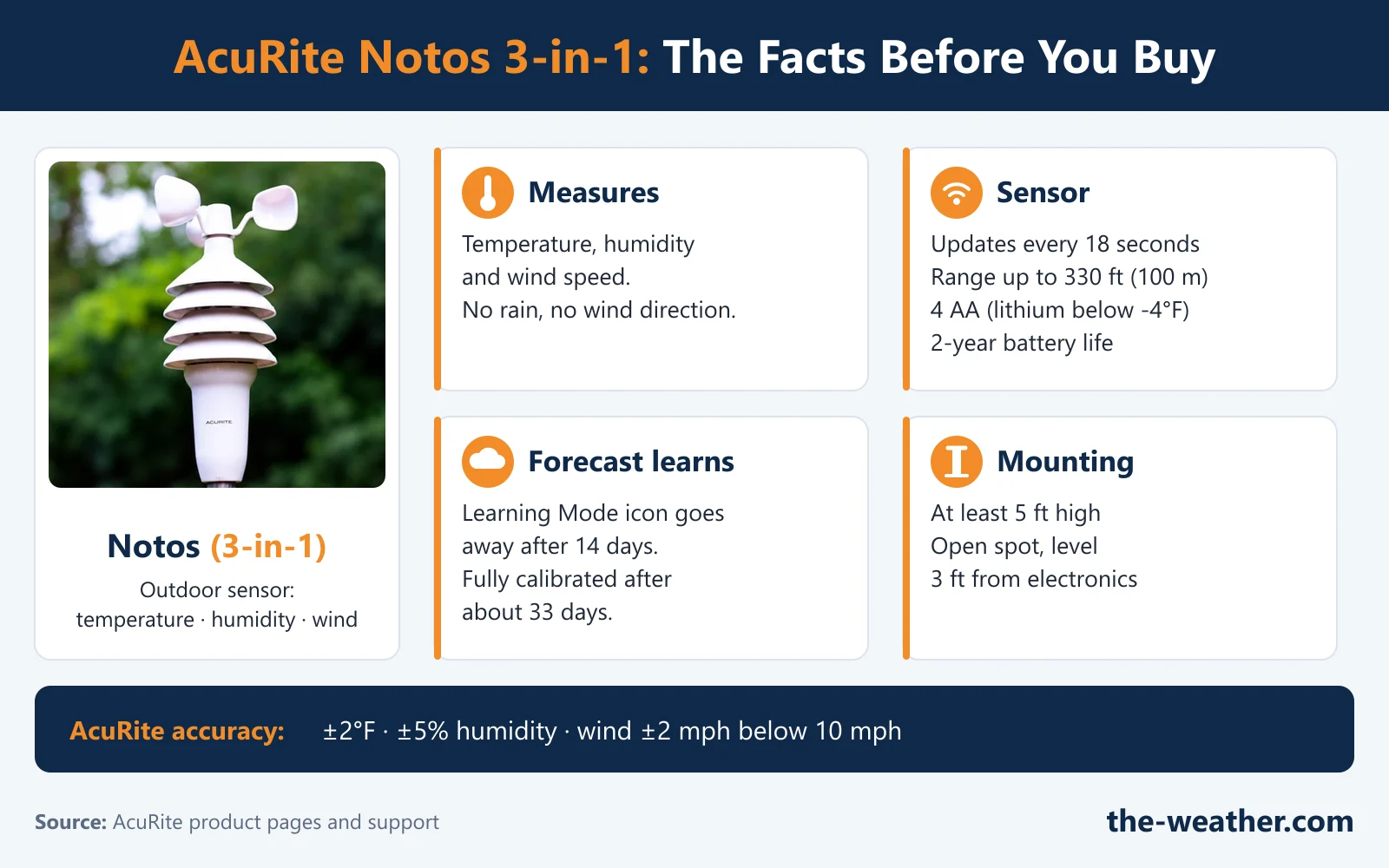
The AcuRite Notos is AcuRite's 3-in-1 weather station. One outdoor sensor measures temperature, humidity and wind speed, and sends the readings to an indoor display every 18 seconds. There is no rain gauge and no wind vane, so it tells you how hard the wind blows, not where it comes from.
This review sticks to what AcuRite documents: what the sensor measures, which Notos versions exist, how the forecast learns, how to mount the sensor and what to do when the readings stop. Where we give our own opinion, we say so.
The Notos makes sense if you want outdoor temperature, humidity and wind speed on a display in your kitchen, without Wi-Fi or an app. It is a simple, focused station. Skip it if you want rainfall or wind direction: that is what the AcuRite Iris (5-in-1) adds. And give the forecast a couple of weeks: AcuRite says it needs 14 days of "Learning Mode" before it is tuned to your location.
AcuRite Notos 3-in-1 Sensor: Key Facts
| What | Per AcuRite |
|---|---|
| Measures outdoors | Temperature, humidity and wind speed (no rain, no wind direction) |
| Outdoor ranges (00589 manual) | -40°F to 158°F (-40°C to 70°C), humidity 1% to 99%, wind 0 to 99 mph (0 to 159 km/h) |
| Data updates | Outdoor wind, temperature and humidity every 18 seconds; indoor readings every 60 seconds (00589 manual) |
| Wireless range | Up to 330 ft (100 m) in optimal conditions |
| Sensor power | 4 AA alkaline or lithium batteries; lithium below -4°F (-20°C); AcuRite advises against heavy duty and rechargeable batteries |
| Sensor battery life | 2 years, according to AcuRite's product pages |
| Mounting | At least 5 ft (1.5 m) high, level, in an open spot; mounting hardware included |
| Replacement sensor | 06008M, the replacement AcuRite lists for the 00589 and 00634 displays. (AcuRite's AcuRite Access list names the Notos sensor 06008RM.) These are model-specific listings: check your display's model number before you order. |
| Replacement wind cups | 06030RM, sold by AcuRite as "Notos (3-in-1) Wind Cups Replacement" |
| Warranty | Limited 1-year warranty |
In plain words: close enough for the garden, the patio and "do I need a jacket", but not a lab instrument. AcuRite's general accuracy standards for the Notos sensor are temperature ±2°F (±1°C), humidity ±5% RH and wind speed ±2 mph below 10 mph (±3 mph from 10 to 30 mph, ±4 mph from 30 to 50 mph, ±5 mph from 50 to 99 mph). The barometric pressure comes from the indoor display, at ±0.15 inHg. AcuRite adds that the exact figures for your model are in its manual. The 00589 product page lists ±2°F for temperature; its manual gives ranges but no accuracy bands. Good to know: the 00589 display lets you calibrate outdoor and indoor temperature and humidity, the wind speed interval and the barometric pressure yourself.
Sources: AcuRite product pages for the Notos stations, AcuRite support articles on the Notos sensor installation, wind speed and accuracy standards, checked October 19, 2026.
Our Amazon button goes to the 00589 with the color "Light Theme" display. AcuRite does not list an atomic clock for it. Want the version with the atomic (self-setting) clock? Our second button goes to the 00634, listed on Amazon as the 00634A3; AcuRite's support page for the 00634 covers both the A3 and the A4.
Check the AcuRite Notos 00589 (color display) on Amazon Check the AcuRite Notos 00634 (atomic clock) on AmazonWhat the Notos Measures (and What It Leaves Out)
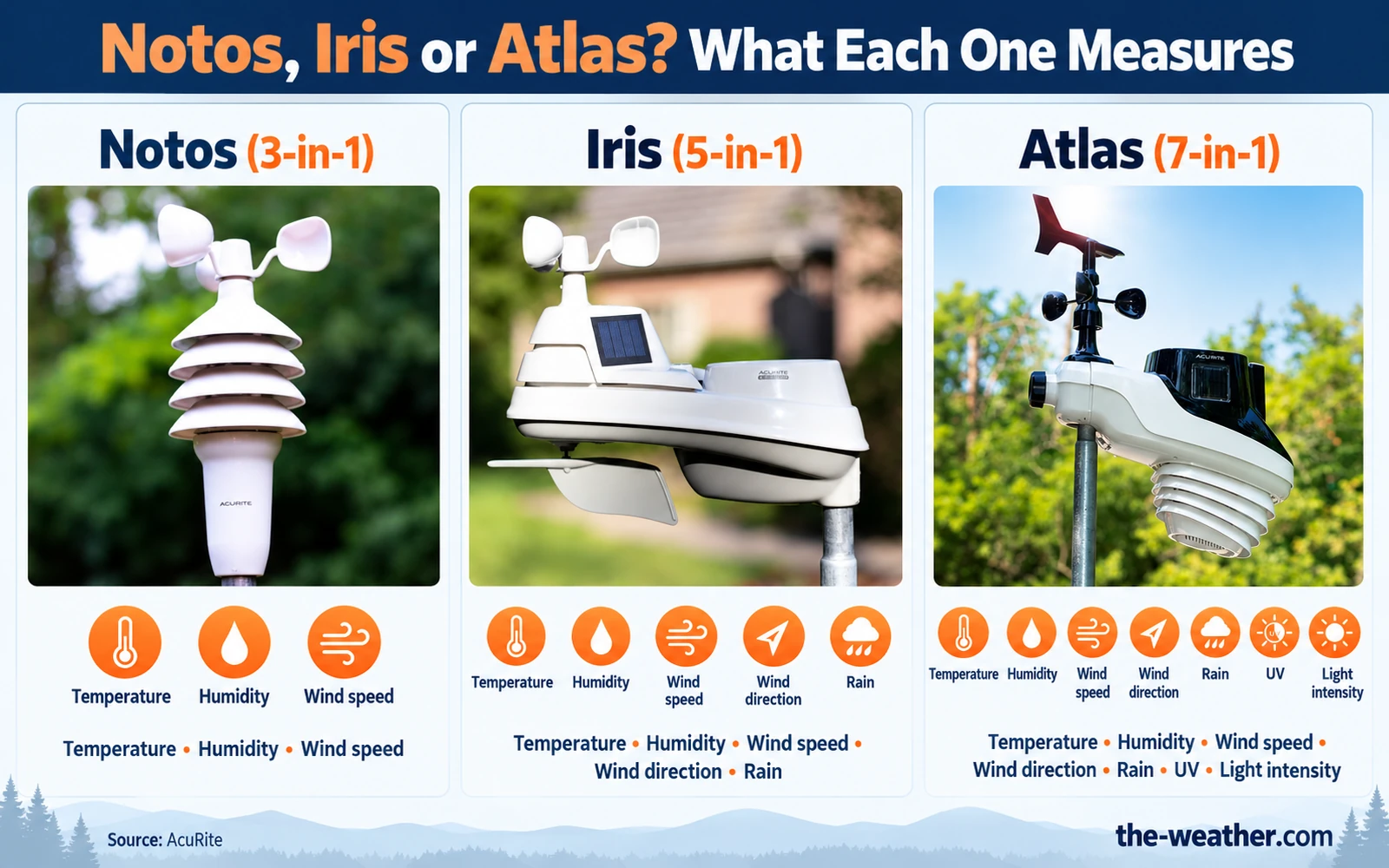
Think of the Notos as the "how does it feel out there" station. The three outdoor readings are:
| Sensor | Measures | Useful for |
|---|---|---|
| Thermometer | Outdoor air temperature | Frost warnings for the garden, what to wear |
| Hygrometer | Outdoor relative humidity (%RH) | Muggy days, dew point |
| Anemometer (wind cups) | Wind speed in mph or km/h | Patio umbrellas, trampolines, storm days. See our anemometer guide. |
The indoor display adds its own readings. On the Notos displays AcuRite lists indoor temperature and humidity, barometric pressure (with a trend arrow, or a 12-hour pressure history on the 00589), heat index, wind chill and dew point. Heat index and wind chill are "feels like" numbers: how hot or cold it feels once humidity or wind is taken into account.
What it does not do: measure rain or wind direction. If you want to know that 0.4 inch fell last night, or that the wind turned northwest before the storm, the Iris is the AcuRite step up. Our Notos vs Iris comparison goes through the differences.
Notos Versions: Which Display Do You Get?
"Notos" is the name of the sensor family, and AcuRite pairs it with several displays. That is where buyers get confused, because the display decides the clock, the colors and the extras. These are the Notos stations AcuRite lists on its own website:
| Model | Display | Good to know (per AcuRite) |
|---|---|---|
| 00589 / 00589MCB | Illuminated color LCD, "Light Theme", adjustable dimmer | Power adapter included (AcuRite calls it the primary power source), 6 AA batteries as optional backup that keep your records during a power cut; 12-hour history chart for pressure, outdoor temperature and humidity; low, average and peak wind over the last 30 minutes; daily, monthly and all-time records; 48 hours of replay data; tabletop stand or wall hang hole. Batteries are not included. No atomic clock or alarm in the manual. This is the version our Amazon link points to. |
| 00634A4 | Digital LCD | Atomic (radio-controlled) clock and calendar, moon phase, 12-hour history chart for temperature, pressure and wind; tabletop or wall |
| 00638A4 (1st Gen) | Digital LCD | Same feature list as the 00634A4 on AcuRite's site, including the atomic clock |
| 01604A2 | Illuminated color display, auto-dimming | Intelli-Time clock (not atomic), moon phase, daily and all-time records, manual pressure calibration; tabletop |
| 00622MCB (Reverse Color Display) | Reverse color display, auto-dimming | Daily, monthly and all-time records, history chart for temperature, humidity and wind; AC adapter included; tabletop or wall |
Source: AcuRite product pages and AcuRite support articles for the 00589 and 00634, checked October 19, 2026. Features can change between production runs, so check the model number on the box or the listing before you buy.
Our take: if you want a self-setting clock, look for the atomic versions (00634A4, 00638A4). If you prefer a lit color screen, the color versions (00589, 01604A2, 00622MCB) are the ones to compare. The outdoor sensor belongs to the same Notos 3-in-1 product family, but the display versions differ in clock type, history features, power options and mounting. Check the exact model number before you choose a replacement part.
The Self-Calibrating Forecast: Give It Two Weeks
Every Notos display shows a forecast icon. AcuRite calls it Self-Calibrating Forecasting: the display uses the pressure readings from its built-in barometer, together with the data from your outdoor sensor, to make a forecast for your own spot. AcuRite lists the forecast as 12 to 24 hours ahead (the 00589 manual says the same; its product page says 12 hours).
The catch is that it has to learn first. AcuRite explains how this "Learning Mode" works:
- The display starts from the global average air pressure (29.92 inHg).
- It then takes 4,000 readings, one every 12 minutes, to work out the pressure for your altitude.
- After 14 days the Learning Mode icon disappears and the pressure is "reasonably accurate".
- The calculation keeps running until all 4,000 readings are in, which takes about 33 days.
- The 00589 manual adds: removing the batteries or resetting the display restarts Learning Mode.
Where to Mount the Sensor (From AcuRite's Guide)
- Mount it at least 5 feet off the ground; higher is better for wind
- Choose a wide-open spot with few structures around it
- Make sure it is level (AcuRite suggests a bubble level)
- Keep it within 330 ft of the display
- Keep both units 3 ft (0.9 m) away from TVs, microwaves and computers
- Near heaters, air conditioners, chimneys or exhaust vents
- Above asphalt or concrete that radiates heat
- Near pools, spas or other water (affects humidity)
- Where a sprinkler can spray it
- Behind large metal objects or thick walls that block the signal
For the pole, AcuRite mentions a 2x4 or 4x4 piece of wood, a 3/4 inch schedule 40 PVC pipe, or a steel pole with an outer diameter of one inch. AcuRite also notes that the National Weather Service recommends mounting wind sensors at 33 feet with no obstructions within 100 feet. Few backyards allow that, and AcuRite says your sensor gives an accurate reading for the spot where it is mounted. So if the TV station reports 20 mph and your Notos says 9 mph, in our view the height and the trees are the first suspects, before a broken sensor.
Setup in Short
AcuRite's installation steps for the Notos sensor:
- Press the release lever and pull off the bottom of the sensor to reach the batteries.
- Set the A-B-C switch to the same letter as the switch on your display.
- Insert 4 AA batteries (fresh, 1.5 volt, not mixed; lithium if it gets colder than -4°F).
- Fix the mounting base to a post or pole, put the sensor on top and screw it in place.
- Check that it is level.
The 00589 display runs on its AC adapter, with 6 AA batteries as optional backup. The A-B-C letters are the first thing to check if the display shows dashes after setup.
Can the Notos Go Online?
Not on its own: the Notos displays in the table above have no Wi-Fi. AcuRite does list the Notos sensor (06008RM) as compatible with the AcuRite Access, a separate hub that accepts up to 7 sensors. With it, the sensor data shows up on the My AcuRite dashboard, which AcuRite says updates every 5 minutes. If an app and remote access matter to you, a station with Wi-Fi built in is simpler, such as the Ambient Weather WS-2902C or one of the AcuRite Wi-Fi displays in our AcuRite overview. And if you only care about temperature and humidity, you do not need wind cups at all: a simple indoor/outdoor thermometer does that job.
Pros and Cons
- Temperature, humidity and wind speed from one compact outdoor sensor
- Outdoor readings update every 18 seconds
- Several display choices, including atomic-clock and color versions
- Forecast based on your own location after the learning period
- Repairable: replacement sensor (06008M) and wind cups (06030RM) sold separately
- No rain gauge and no wind direction
- No Wi-Fi on the display; online only through the separate AcuRite Access
- The forecast needs 14 days of Learning Mode, and about 33 days to finish
- Many versions with different displays, so check the model number
- Wind readings depend heavily on mounting height and open space
Troubleshooting the Notos
Most problems are a lost connection between sensor and display. AcuRite lists these signs: dashes instead of an outdoor temperature, an outdoor temperature that does not change, no wind speed, -40 degrees or 1% humidity on the screen.
| Problem | Check first (per AcuRite) | Then |
|---|---|---|
| Dashes or a frozen outdoor reading | Same A-B-C letter on both units, distance, 3 ft from electronics, fresh batteries | Hard reset (below) |
| -40°, 158°, 1% or 99% | AcuRite treats these as error codes; check heat and moisture sources and the 5 ft mounting height | Hard reset |
| Wind speed too low | Compare with a sensor at the same height; clear obstructions | Clean the cups; AcuRite suggests graphite powder or a spray lubricant |
| No wind speed at all | Cups spin freely? | Hard reset |
AcuRite's hard reset for the Notos (from AcuRite support):
- Bring the sensor and the display together and remove the batteries from the outdoor sensor. The signal indicator on the display should drop to zero bars. (If it still shows a strong signal, your display is picking up another sensor nearby.)
- Remove the batteries and/or the power adapter from the display.
- Set the A-B-C switch on both units to a new, matching letter. If your display has a reset button, press and hold it for 20 seconds now.
- Put the batteries back in the outdoor sensor.
- Put the batteries and/or power cord back in the display. If your display has a reset button, immediately press and hold it again for 20 seconds.
- Leave both units within a couple of feet of each other for about 5 minutes, or until you see a solid sensor signal.
On the 00589: its manual uses a simpler sync: bring both units indoors, remove at least one battery from each, make sure the A-B-C letters match, put the battery back in the sensor first and then in the display, and leave them a couple of feet apart for about 20 minutes. Careful with its CLEAR RECORD/RESET button: pressing and holding it resets the display to factory defaults, so you have to set the time and date again and Learning Mode starts over. Our AcuRite reset guide covers the other AcuRite models.
Who Should Buy the AcuRite Notos?
| Buyer type | Our view | Reason |
|---|---|---|
| Wants wind speed and temperature on a display, no app | Good fit | That is exactly what the Notos is built for |
| Wants a self-setting clock | Good fit | Pick an atomic-clock version (00634, 00638A4); our 00634 link goes to Amazon |
| Wants to see readings away from home | Conditional | Only with the separate AcuRite Access |
| Gardener who wants rain totals | Look elsewhere | No rain gauge; the Iris measures rain |
| Wants wind direction, UV or light | Look elsewhere | The Iris adds wind direction; the Atlas adds UV and light |
Should You Buy the AcuRite Notos?
In our view, yes, if your wish list is short: outdoor temperature, humidity and wind speed on an easy-to-read screen, with a forecast that learns your spot. It does fewer things than a 5-in-1, and that is the point. Choose the display version first (clock, color, wall or tabletop), mount the sensor high and in the open, and give the forecast its two weeks.
Notos or Iris? The Iris adds two things: rainfall and wind direction. If you will want a rain total after the first big storm, the Iris 5-in-1 is the better fit. If you mainly want temperature, humidity and wind speed, the Notos covers that with a simpler sensor. On durability: AcuRite gives a limited 1-year warranty, and both the sensor and the wind cups can be replaced separately.
Check the AcuRite Notos 00589 (color display) on Amazon Check the AcuRite Notos 00634 (atomic clock) on AmazonVideo: The Notos Up Close
This video from the YouTube channel Online Shopping Must Haves shows the Notos sensor and display. It is their video, not ours.
Frequently Asked Questions
What does 3-in-1 mean for the AcuRite Notos?
The outdoor sensor measures three things: temperature, humidity and wind speed. Indoor readings, barometric pressure and the forecast come from the display.
Does the AcuRite Notos have Wi-Fi?
The Notos displays do not. AcuRite lists the Notos sensor (06008RM) as compatible with the AcuRite Access, a separate hub you buy extra, which puts the readings on the My AcuRite dashboard.
Does the AcuRite Notos measure rain or wind direction?
No. AcuRite's Iris (5-in-1) sensor adds rain and wind direction.
How long before the Notos forecast is accurate?
There are two moments. After 14 days the Learning Mode icon disappears: AcuRite says the pressure is then reasonably accurate and the forecast "fairly accurate". But the self-calibration keeps running until all 4,000 readings (one every 12 minutes) are in, which takes about 33 days. Removing the batteries or resetting the display starts Learning Mode over.
How many batteries does the Notos sensor use?
Four AA batteries of 1.5 volt. AcuRite recommends lithium batteries where it gets colder than -4°F (-20°C) and advises against mixing brands or old and new batteries. AcuRite's product pages list a 2-year battery life for the sensor.
Which replacement sensor fits a Notos display?
AcuRite lists the 06008M as the replacement sensor for the 00589 and 00634 Notos displays. These listings are per display model, so check your own model number first. Our replacement sensor guide shows how.
Sources
AcuRite 00589M instruction manual (linked from the 00589MCB product page). AcuRite product pages: Notos with Light Theme Display (00589MCB), Notos with Digital Display (00634A4), Notos 1st Gen (00638A4), Notos with Color Digital Display (01604A2), Notos R (00622MCB). AcuRite support: Notos sensor installation, Notos reset, inaccurate wind readings, inaccurate temperature or humidity, accuracy standards, wind speed, Learning Mode, 00589 parts, 00634 parts, 00639 parts (wind cups 06030RM), sensors compatible with the AcuRite Access, Notos on the My AcuRite dashboard; AcuRite store: Notos wind cups (06030RM), Iris (5-in-1) sensor, Atlas sensor. Checked October 19, 2026. We did not test this station ourselves. No manufacturer compensation was received.
Lena Thornton
Weather Station Analyst and CWOP Contributor. Lena has researched, reviewed and analysed weather stations and instruments for over a decade. She contributes observation data to the Citizen Weather Observer Program (CWOP).
Ready to decide?
Get the AcuRite Notos
Prices and stock change daily. Check the current price, delivery options and what owners say in their reviews.